

Fresh off the release of WordPress 6.9, we’re now about to go into the “quiet” time of the year. Not only across plugin land, but even here internally.
This week will be my last FULL work week of the year, likely. Not like I’m going anywhere, of course. But, between birthday plans for my daughter (she’s about to turn 18, which is CRAZY), Christmas week and New Years… there’s a lot coming up.
Last week, I created and published my mega-post on my official hosting recommendation. Which is pretty different than how most people do it.
I’m also leaning more into FluentCommunity. I’ll tell you about that.
And lastly, I’ll shed a bit of light into how I make videos. Some equipment, and some advice on how to speed things up. I get questions about that, especially as I have clients wanting to make videos but find it a little daunting.
So, let’s get into it, shall we?
Productive week ahead! Let’s make it count. 😎
Featured This Week

2026 Official Hosting Recommendation: How to Beat Premium WordPress Hosts on Speed and Price
To optimize the performance of your website, your web hosting needs to be the right match for your particular needs. A “one size fits all” approach isn’t efficient. Here’s what I recommend you do instead…
In Case You Missed It…
- The 8 Principles of Digital Sovereignty (Issue #558)
- Your Email Open Rates + Huge Cloudflare Outage (Issue #557)
- Engineering Authority + Spotting Slow Plugins (Issue #556)
- Website Backup Strategy: The Best Ways To Stay Out Of Trouble With Proper Backups Of Your Website
- Saying No (To Yourself) + Why You Should Use Cloudflare (Issue #555)
- The issue on hosting… and slow admin panels (Issue #554)
Leaning More Into FluentCommunity (And A Completely Different Niche)
I have been a fan of FluentCommunity ever since it originally launched a bit over a year ago. While it was in it’s infancy then, I could see the writing on the wall. And I also desperately wanted to be able to recommend something to people for community that wasn’t BuddyBoss. 😜
Not every site warrants a community. I sometimes have people who see the “shiny object” of FluentCommunity and they talk to me about using it to build a community for them. Truth is, however, that community doesn’t always make sense. Plus, it is a lot of work. For business solopreneurs, it could be a massive distraction.
But, sometimes it isn’t. And sometimes it makes a LOT of sense.
Plus, let’s not forget that there is more than one way to use it. As you can see with my Client Center, I have used FluentCommunity as the basis for the customer/client portion of the Blog Marketing Academy. The rest of the site stays as is. My thinking is this:
- The news feed capability provides a place for quick updates and announcements that don’t warrant a whole blog post
- It does enable community functionality, but on my terms. I don’t have any intention of a wide open public community on this site.
- The online course system built into FluentCommunity is actually pretty nice while also being streamlined. So, I’m highly considering moving my courses (which used to be in Learndash) from the video library and over into FluentCommunity.
- While the community portal looks different than the rest of my site, I view that as a strength in my case. I WANT the client center to feel different than the rest of the site. It makes things more focused and easier to find.
But, that’s just the Blog Marketing Academy. Let me tell you about an entirely different site where I’m going “all in” for FluentCommunity.
It is HappilyRV.com. Some of you may remember this little side project of mine. In fact, it is SO much a side project that I have gone months since posting anything. 🥴
That site is for RVers. And it has solely been a blog with an email list pretty much since the beginning. Despite the fact that I don’t post much of anything, the site still manages to get 20-40 people per day coming by.
I think FluentCommunity presents an opportunity to do something different with HappilyRV.com. And so, I set it up. The site will become a community site which happens to have a blog.
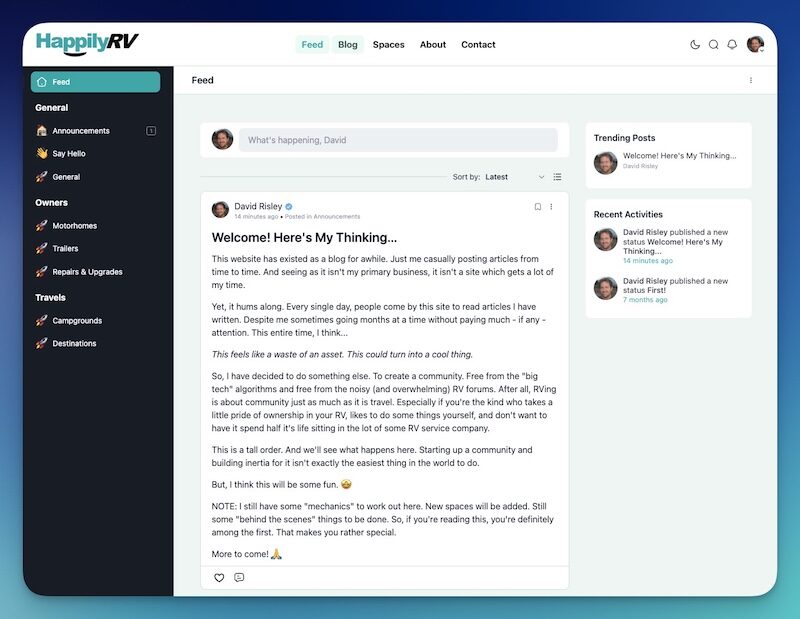
I’m calling it The Campground. Instead of the usual “portal” URL that FluentCommunity does by default, I changed it to “campground”. I’m thinking about calling the different sections “Loops” and may even refer to the different Spaces as Campsites. You get the theme I’m going for. 😉
And I’ve made it so that pretty much every page of the site (except the homepage) will appear within the FluentCommunity theme. That includes all blog posts. Even though Kadence is still in use for this site, FluentCommunity will be in the lead.
I’m specifically NOT over-building this site. I see too many people try to build up big fancy BuddyBoss sites, only to create this frankenstein site that is hard to manage because of all the bells and whistles they think they need. It is usually a waste of time.
I love that FluentCommunity does what it does… simply.
Concierge Client Update – New Format!

Let’s Try Something New…
Instead of the usual text-only update for Concierge, let’s do it in video format. Click the button below to see the Concierge Weekly Update, posted directly into the Client Center…
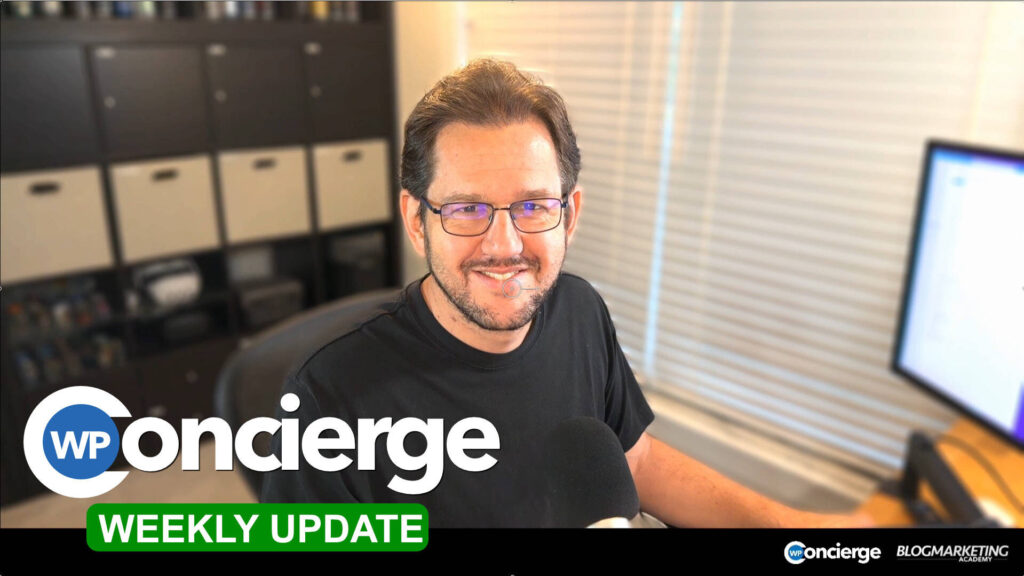
Always find video to feel more natural. And it seems like the perfect fit for client updates. One of the reasons I also record private videos for clients on a fairly regular basis.
Maybe we’ll make this the new normal for weekly updates. 😇
WordPress News & Updates
WordPress 6.9. WordPress 6.9 was pushed out last week and a lot (if not most) sites tend to auto-update. For clients, I’ll be ensuring everybody is running 6.9 today. Updates include notes in the block editor (for collaboration), simpler drag-and-drop, command palette (for the keyboard warriors), and many other things. It also includes the new Abilities API, which sounds dorky and irrelevant to most of us, but it isn’t. The framework for this new API is going to be a big deal for WordPress being able to be operated by AI as the future unfolds. It provides a unified system for plugins to register abilities with WordPress so that AI tools can operate your WordPress site.
Promptless WP. A new tool is coming (waitlist currently) called Promptless WP. This tool will enable you to write content in Word documents and them automatically transfer them into properly formatted content within WordPress. Could be interesting. I always recommend people NOT use Word to write posts, but some people still do because it is familiar. Typically, if you copy/paste from Word into WordPress, it brings all kinds of junk with it and the formatting needs a lot of correction. If this tool makes it easier, could be a time-saver.
FluentCart 1.3.2 It Out.. The new release of FluentCart has shipped Authorize.net integration for payments, a new “private” status for products, recurring discounts for coupons, customizable checkout block, and more. Click here to see the full details. Word is that the next release will include a one-click purchase button. This is going to be a massive feature, especially for membership sites. Imagine your existing customers and members can purchase additional things from you with just a single click instead of going through the checkout process again.
State Of The Word. Matt Mullenweg delivered his big annual State of The Word address in San Francisco. The reply is now available to watch online. He did a live launch of WordPress 6.9, talked about the future of WordPress when it comes to AI, global growth, and more efforts when it comes to education, security and inclusiveness.
FluentCommunity 2.1.02 Is Out. This version adds a new option to “Join Space” for public posts, a flagged post edit option, improvements to the navbarUI, etc. It is mostly a maintenance release. You can see everything about this update right in their own community post about it.
Virtual Media Folders. There’s a few different ways already to be able to organize your media library into folders, but a new one called Virtual Media Folders has been published to GitHub. Folders are virtual, so it will not change any of your file path URLs. Handy… and free.
WP Awards Winners. Every year, the WP Weekly does it’s public voting to determine the most popular plugins. This year, the winners include Astra, Elementor, Fluent Forms, ACF Pro, RankMath and more. The “Fluent” products had a great showing. Keep in mind, votes are limited in scope, so I wouldn’t look at this as some market-wide reference. But, still, you might discover some tools you didn’t know about. Check out this year’s results.
Turn WordPress Content Into Ebooks. The eBook Crafter plugin might make it a little simpler. Create your content in WordPress using the standard block editor, and this plugin will enable you to easily export into a PDF ebook you can use as a lead magnet. I’ve never used it, but maybe I’ll line up a review.
FluentMCP. Spencer Forman has launched FluentMCP, a plugin that enables you to work with the Fluent suite of products using AI tools such as Claude. It looks interesting, for sure. I do think it seems a little pricey, however. And there are other ways to do it, such as using Ottokit MCP servers and it’s army of integrations with Fluent products.
My Process For Recording Videos
I know this one isn’t really WordPress-centered, but it is something I’ve been asked about numerous times. That is… how I record videos. And how I host them.
I am a BIG proponent of using videos. I think it communicates more naturally and more “human” than the written word. I still love me some blog posts!… but, it is hard to beat a video for building trust, building a relationship, and letting people get to know you.
I record videos for Youtube (which is a big driver of new business for me, actually), for training content, for updates.. and even private clients.
The goal with video is always to make it as EASY as you can. It is inherently more work than written… and I don’t think that will change. But, the more you can streamline it and simplify it, the better.
So, here’s what I do…
- I have a camera permanently setup on my desk, mounted using a mount. In my case, it is a Sony a5100 with a Sigma 16mm lens. The camera is only used as a webcam, but is connected directly into my computer using an HDMI cable. You do NOT need a camera like this, but the big idea is that the camera is always there, aimed in such a way where I can just turn it on and go. No setup.
- Audio is very important for your video to work well. Perhaps even more important than video quality. Do not record using the microphone built onto the camera. Instead, use a USB mic that sounds good. In my case, I use a Heil PR40 piped into a USB interface made my FocusRite. That might be a bit overkill, though. A good quality USB mic will work perfectly fine.
- You need lighting. Even a nice camera will make dull videos if your lighting sucks. I have multiple LED lights attached directly to my desk. I have a push-button remote that I can just hit a button and they turn on. They are preset to a lighting level that works fine for my Youtube videos. Again, the key here is to able to do record as quickly as possible without doing a whole setup thing every time.
- I usually record directly into Screenflow, which is Mac only. You’ll need to find something that works for you. Some people even go the free route and use the open source OBS software.
- Public videos are usually uploaded to Youtube. Videos not suitable for Youtube (members-only, client updates, etc.) are put into Bunny.net.
Now, the exact setup I use here is not really the important point. Video stuff can be a rabbit hole. 😜 It CAN get expensive, but doesn’t have to. Actually, your smartphone likely has a REALLY awesome camera and you already have it in your pocket. In my case, I run it through Camo Studio and it makes one hell of a webcam.
But, the main theme is to spend some time getting a setup that works for you. Do it ONCE. Then, have it permanently setup and ready to go. You want to be able to go FAST without a lot of thought.
When I record a video, I open up Screenflow, turn on the camera, hit the button to turn my lights on, swing my mic (on the boom arm) so it is front of my face… and I hit the GO button. I’m ready to blab within less than a minute. 😛
Lastly, there’s always that concern about how you look – and how you sound. And, what to say. All I can do is offer up a few thoughts on that…
- Just be yourself. Don’t stress out about being perfect. Just be natural, as if you were talking to somebody right there in the room.
- I don’t ever script anything. The most I ever do is a few bullet points to remind me what to say. But, my videos are just me going “off the cuff”. Much easier than fussing with a script and a teleprompter. Again, the goal is speed.
- I do everything in one take. I don’t re-record. I don’t sit there and get judgmental on myself. I will do some basic edit cuts… and that’s it.
- You get better at it the more you do it.
- A video that isn’t “perfect” often works better than the perfect ones. Being your normal self works much better than trying to come off all scripted and robotic.
I encourage you to make videos. I see too many people who know they should, but they don’t for fear of looking weird on camera, or not knowing how. Such thoughts are getting in your way. You’ve got a new year about to begin. Maybe more videos should be on your agenda. Which means you can use the last few weeks of 2025 here to get your gear in order so you can do it.

Here’s how I help people every day…

Make everything about managing your site simpler… by having me on your team to help make sure everything goes smoothly. By providing the very best tools, the best hosting and maintaining everything for you… I’ll take care of the mechanics so you can just focus on growth.
Did you like this issue? Consider sharing the opt-in page on social media to help it grow.
And feel free to forward it on to somebody you think will benefit from it.
The WP Edge is the official weekly newsletter of the Blog Marketing Academy.
