

Can you believe we’re only about 2 weeks from 2026? 🤯
I’m not resting (yet). I mean, I’ve got a lot of family stuff coming up due to the time of the year, but I’m also busy revamping some things in advance of the new year.
Starting with a full re-do and cleanup of the pages about Concierge. Making my hosting platform official, as well as making the Essentials plan official.
I’m also redoing my optin strategy. That I will tell you about below… because it might be something you want to consider for your own site, too. It isn’t rocket science by any means. It is about making things simpler.
We’ll also talk about your site search function. Should you even have one? And, if you do have one, how can you make it… not suck? 😇 Because, the default WordPress search actually does suck. Just gotta call it what it is.
Anyway, fresh week! And one of our last for the year. So…
Let’s launch this thing!
Featured This Week

2026 Official Hosting Recommendation: How to Beat Premium WordPress Hosts on Speed and Price
To optimize the performance of your website, your web hosting needs to be the right match for your particular needs. A “one size fits all” approach isn’t efficient. Here’s what I recommend you do instead…
In Case You Missed It…
- FluentCommunity + How I Make Videos (Issue #559)
- The 8 Principles of Digital Sovereignty (Issue #558)
- Your Email Open Rates + Huge Cloudflare Outage (Issue #557)
- Engineering Authority + Spotting Slow Plugins (Issue #556)
- Website Backup Strategy: The Best Ways To Stay Out Of Trouble With Proper Backups Of Your Website
- Saying No (To Yourself) + Why You Should Use Cloudflare (Issue #555)
Re-Thinking My Site’s Email Opt-in Strategy…
I have been on a stint of modifying and simplifying the Blog Marketing Academy website. Due to how long the site has been around and all the evolutions I’ve done over the years, there’s things to clean up. 😛 My goals overall are:
- Content audit to remove the old, outdated stuff which isn’t relevant anymore and modernize the stuff that is.
- Centralize and modify all the calls to action around the site so that they are in-line with current goals.
- Modify and steamline core offers, corresponding sales pages, etc. (You may notice I re-did the entire Concierge page setup last week)
This is stuff that, frankly, anybody with a larger WordPress site operated for business purposes needs to do sometimes – and regularly. We need to make sure that all of the content serves it’s purpose, that sales funnels are streamlined, and that calls to action make sense – especially as things change over time. I still had (and have, likely) calls to action to join the “LAB” around the Blog Marketing Academy. My long-time subscribers probably remember the LAB being my membership, but…. yeah, it doesn’t really look like that anymore. 😜
Anyway, one of the things I’ve re-thought is the opt-in strategy. My goal here is to SIMPLIFY it.
See, for a long time, I’ve been a fan of having multiple lead magnets across your website. Lead magnets that fit different contexts and different mindsets…. because not everybody is the same.
And, to be clear, I have not changed on that. Multiple lead magnets instead of “one size fits all” makes way more sense strategically. BUT…
It is bulky and annoying to sit there and try to manage multiple different opt-in funnels. This means:
- A whole lot of different opt-in forms – each which needs to be built, has it’s own settings, etc.
- Emails to be written, automations to be set up
- Then, managing and remembering where all of those opt-in forms are sprinkled all over your website. 😜
You keep doing this and you end up with a lot of clutter on the backend. Tons of different opt-in forms, funnels, email templates, etc. You forget what goes where. You wanna change something and you gotta go play Sherlock Holmes on your own website to track down where the hell things are.
Then, you got yourself a Frankenstein. (See: Have You Created A WordPress Frankenstein Site That Breaks All The Time?). Frankenstein sites suck. 😉
So, my solution is to CENTRALIZE it. My solution, for my particular site, is what I’m currently calling The Solopreneur Toolkit. As you can see on that landing page, it is ONE branded lead magnet – a kind of “vault” – that contains whatever else I want to offer. My other more specific lead magnets will be all inside of ONE vault. New people will then opt-in to get access to that Vault.
This means…
- One primary landing page (making it much simpler to track and optimize)
- One primary opt-in form
- One centralized place on my website where I can put these things – and then optimize. Much nicer than just linking directly to a PDF.
In terms of context and placing the right lead magnet into the right context, I can still do that. For instance, if I have my Membership Site Planner as a call to action on a blog post having to do with membership sites, I can STILL do that. But, instead of an entirely separate optin funnel, I just say it is part of the Solopreneur’s Toolkit and invite them to get access. That same basic CTA can be used anywhere on the site, but re-framed into the context that fits.
The Vault itself is not password protected. I don’t want to deal with the hassle of user logins for this. You can actually see the setup for it right here. It is simple, but it is set up for future expansion.
- It uses a custom post type so I can easily add new resources to it in the backend.
- Each resource will have a call to action included. Right now, the CTAs are not there because I haven’t gotten to it yet, but each resource will have a highly relevant call to action right on the same screen.
Then, the plan is to have one, centralized email sequence that will sprinkle these resources out slowly over time via email to subscribers. Like, an extended welcome sequence. Yes, they’ll have access to everything right away (I’m not bothering with a timed release), but I’m still going to do a timed autoresponder sequence that gently reminds them of resources (and new ones) over time.
Anyway, I don’t present this to you today as some kind of massive breakthrough. 😜 It isn’t. But, I’m just sharing what I am now doing in case it helps jive any ideas for you on your own email optin strategy.
We don’t want to over-complicate things…. and it is all too easy to do.
Power lies in simplicity. And one, central optin funnel is a lot easier to manage and really dial in than 10-15 little tiny ones all over the damn place. 😜
Concierge Client Update
For the second week, I’m doing our weekly update in video format. I kinda like it this way. 😇 Feels more personal. And more of a “behind the scenes” nature for my clients.
Anyway, in this update, I talk about the BOT problem and what I am doing about it (and why it might look like a traffic decrease)… as well as a server upgrade for the Concierge hosting platform last week.
Heres the video update…

WordPress News & Updates
A little quiet in WordPress-world, due to the holiday season. But, here’s what we got…
WordPress To Blame For A Budget Leak? Over in the UK, the Office of Budget Responsibility (OBR) accidentally leaked their budget in advance of when it was supposed to go out. And, they blamed WordPress. 😜 Of course, government organizations don’t like to be responsible, so they gotta blame something. In reality, they just didn’t know what they were doing. They were using the Download Monitor plugin, but didn’t have proper permissions on the folder. With the predictable nature of the directory structure, it meant people could access the budget PDF directly and bypass Download Monitor. Is that WordPress’s fault?
WPEngine Wants to Include WooCommerce In Lawsuit. In the ongoing lawsuit between WPEngine and Automattic, it looks like they want to add WooCommerce to the mix, too. WPEngine alleges that WooCommerce also played a role in poaching customers away from WPEngine after WordPress.org blocked the company from accessing it’s servers. If you’re a legal nerd, you can check out the legal documents here.
FuseWP Gets An Update. I loosely follow FuseWP ever since I originally reviewed it. It is essentially a competitor to WPFusion. FuseWP has a new update that now has a sync job retry mechanism, optimizations for working with BeeHiiv, and a bug fix on MemberPress integration. Full changelog can be found here.
AI As a WordPress Norm. Jason Adams envisions AI becoming as normal for WordPress as the database. Most people who use WordPress barely even know what a database is, yet they’re using it because it is so normal not to even think about it. Jason thinks AI will eventually become this way in WordPress. It will become so normal that it becomes part of the scenery.
SureForms Has New Integrations. SureForms 2.1 was released, offering new integrations with HubSpot, MailPoet and WPFusion. I admit… I still wonder what the point was of SureForms since there was already so many forms plugins (and good ones) before it rolled around. I haven’t tested it yet, but I did happen to notice that SureForms has a much more natural integration with Ottokit (which makes sense since it is the same team, essentially). And, this does make some interesting backend automations simpler. You can integrate other forms plugins with Ottokit as well, but not as natively.
WPTuts Switched From Circle To FluentCommunity. Paul Charleton, who runs WPTuts, has shut down his WPTuts Academy on the Circle platform… and moved to officially to his own WPTutsCommunity.com – which is powered by FluentCommunity. With FluentCommunity getting so good…. combined with Circle’s rising costs, weak integrations and feature limits, he made the right move. Here’s his Youtube video discussing this.
Remind Me. A new little plugin called Remind Me has been launched with the purpose of helping you remember when annual plugin licenses are coming up for renewal. You can be reminded of it right from within WordPress. Pretty simply plugin, from the looks of it. But, could be handy.
SureRank Stealing Code? Sybre Waaijer, founder of The SEO Framework, alleges on X that SureRank is stealing and using code from RankMath without attribution. And, I guess in the past, RankMath has used code from YoastSEO.
Should You Have a Search Function? And How to Make It Suck Less.
I could easily do a full article on this – and likely will. But, let’s do the cliff notes version right here in the newsletter.
When it comes to having a search function for visitors on your website…. should you?
I see a lot of blogs out there that stick the search form on their site just because they think it looks good. Cool sites have search engines, right? 😜 But, the problem is that that same site has a very small amount of content.
A search engine on your site where people are likely to run into dead-ends most of the time makes no sense. You’re way better off just not having a search function at all.
Look at your blog posts and pages. Do you have, like, 30-40 articles on your site – or less? Then, there’s no point in having a search function. You just don’t have enough there. Most people who use your search form are going to run into dead-ends because you’re not likely to have anything relevant for them. From a marketing perspective, then, you’re just scattering them. It is totally counter-productive.
Now… let’s say you DO have enough content to warrant a search engine. A few hundred blog posts, perhaps. Other custom post types (for instance, I have all of my WP Edge newsletter archives). When you want to use the WordPress search function, you then run into another problem…
The WordPress default search engine sucks.
Like, it really sucks badly. It is incredibly simplistic and stupid. It is just a simplistic keyword search on titles and post content. It doesn’t do phrases very well. It can’t search custom fields. It is nerdy to make it search other post types. It has no weighting. It is just as basic as it gets.
So, here is what I have done…
I use Relevanssi. This plugin fixes WordPress search and makes it actually useful.
It takes a bit to get it all set up the way you like, but it isn’t too difficult. But, it can search custom fields, PDFs, other post types – you name it. It also creates it’s own index so that searches are faster and far more accurate.
There’s also another well-known plugin called SearchWP. It is actually very well done and has a nicer interface. Sadly, though, it was acquired by Awesome Motive and now has all of the baggage associated with that – including the sky-high price tag.
One little nerdy thing, but the Relevanssi plugin more or less relies on the default search form. You can use it’s shortcodes to create custom forms, but if you want to use the nice looking search that might be built into your theme, you end up needing to modify what it actually searches.
In my case, I use Kadence. A lot of my clients do, too. The Kadence theme has a nice header search form and search icon. I can easily put a little search icon into my header and when they click on that the search form pops up. I like it. Problem is, that search form by default will only search posts. So, I fixed that by using the following code snippet:
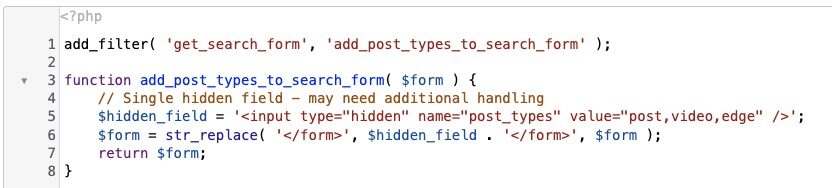
This code is specific to my site, but you can see I am making the standard search form now include 3 different post types: posts, videos and edge (which is my newsletter).
Now, when people search for something, it searches all 3 at once. I also have some other custom code in place that will label each result for type, so it is obvious whether it is an article, a video, or a newsletter issue. It wasn’t too difficult. I used ChatGPT to help me create the code. 😎
If you want my help to improve your site’s search engine, just let me know. Concierge clients, I can handle it for you.
But, again, be sure you have enough there to justify it. A lot of sites out there just don’t have enough content to warrant a search engine. At least not yet. If you’re in that boat, then just ensure content is presented in a nice, clean way so people can easily find what interests them. But, spare them the frustration of hitting dead-ends on a search form.

Here’s how I help people every day…

Make everything about managing your site simpler… by having me on your team to help make sure everything goes smoothly. By providing the very best tools, the best hosting and maintaining everything for you… I’ll take care of the mechanics so you can just focus on growth.
Did you like this issue? Consider sharing the opt-in page on social media to help it grow.
And feel free to forward it on to somebody you think will benefit from it.
The WP Edge is the official weekly newsletter of the Blog Marketing Academy.
