

Can’t believe we’re already at that time of year again. Thanksgiving week here in the US. Which also means…. Black Friday promos.
For the third year in a row, it is just business as usual for me. I won’t be sending you a pile of Black Friday promos. You’re welcome. 😎
But, if you’re going to go out there and go shopping for WordPress themes and plugins, just be careful not to just throw money at shiny objects. If you don’t have an immediate need for a plugin, I don’t recommend you buy it. There’s a really good chance that if you buy it “just in case” or “for later usage”, that that time will never come.
Also, for those of you in Concierge, don’t forget I already maintain licenses to a ton of stuff out there, so in a lot of cases you wouldn’t need your own license anyway. Just ask me.
OK, in this issue, we’ll talk about the single biggest thing you can do to maintain higher open rates on your emails. Especially for those of you using FluentCRM.
Then, we’re going to talk about that massive Cloudflare outage last week. Seemed like it took down half the internet, including a number of my clients. Let’s do a post-mortem on that.
And before we dive in…. a preemptive Happy Thanksgiving to you! We’ll have a shorter week this week… and I hope you get to spend some quality time with your family.
OK, let’s go…
Featured This Week
Why I’m Moving Sites Away From Rocket.net Hosting
I am a big fan of Rocket.net hosting. So, if that’s the case, why I am moving my sites and my clients’ website out of Rocket.net and onto another hosting setup? In this video, I explain why.
In Case You Missed It…
- Engineering Authority + Spotting Slow Plugins (Issue #556)
- Website Backup Strategy: The Best Ways To Stay Out Of Trouble With Proper Backups Of Your Website
- Saying No (To Yourself) + Why You Should Use Cloudflare (Issue #555)
- The issue on hosting… and slow admin panels (Issue #554)
- How To Convert From BuddyBoss To FluentCommunity
- The Cutthroat World of Plugin Competition (Issue #553)
The Most Important Thing About Your Email Open Rates
Everybody wants to maximize the amount of people who open your emails when you send them. You want those open rates to stay up. But, there is one thing you need to be doing which is MOST important…
Stop sending to people who don’t open anything. 🤓
Seems simple… because it is. If your system cannot detect them opening emails or clicking on any links in those emails…. then you need to stop sending to them. Yes, even if they’re subscribed.
It sucks, I know. We all want big email list and lots of subscribers, so it really sucks when you have to stop sending to them even when they’re subscribed. But, it is the right thing to do. It literally makes everything better when you do. Higher open rates, higher deliverability, etc.
What you should do is break your list up into segments. Those segments will be based on their behavior in terms of opening emails or clicking on links in those emails.
One approach I kinda like (modeled after what Campaign Monitor does) is to have the following segments:
- Active – Subscribers who last opened/clicked within the last 30 days
- Engaged – Opened/clicked between 30 days and 90 days.
- Unengaged – Opened/clicked between 90 and 180 days
- Dormant – Open/clicked between 180 days and 1 year.
- Zombies – Opened/clicked more than a year ago
- Ghosts – Never opened/clicked on anything, but been on the list more than a year
This approach might be more granular than you need, but it does provide a nice overview of the overall level of engagement with your emails.
Now, let’s talk specifically about users of FluentCRM. After all, I use FluentCRM and a large chunk of my clients do as well.
FluentCRM has a feature called “Dynamic Segments” and I recommend you use it to set up these segments. A dynamic segment is a set of search criteria that captures chunks of your email list dynamically. When a subscriber fits the criteria, they’ll automatically be part of that segment. When you can send your emails to those segments. Think of it like a preset for who to send your emails to.
Here’s what my own dynamic segment settings look like for my Engaged segment:
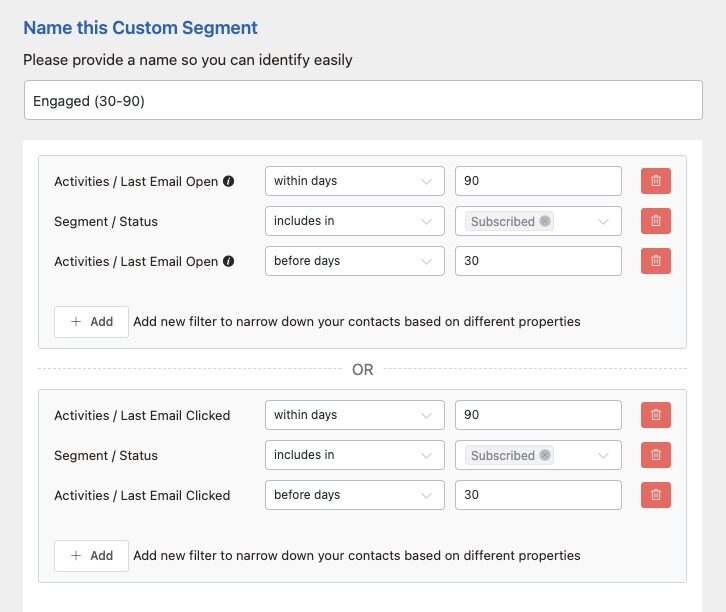
The verbiage on these date filters is a little interesting. 🤔 But, the ones I use most are “Within Days” and “Before Days”. “Before Days” means any day earlier than X days ago. “Within Days” means within the last X days from the present. By combining these criteria, I can capture people who have opened/clicked within 90 days, but not within the last 30 days.
One other little FluentCRM quirk here…. when you go to send out an email campaign, you cannot exempt a dynamic segment. You can only include one. And… only one.
So, if you wanted to send out your newsletter to only people who have been active within the last 180 days, you would need to have one dynamic segment that captures any opens/clicks within 180 days. Then, when you send out your campaign, you send to that segment.
For those older segments, you should stop emailing them regularly. You absolutely need to start filtering out the people who are not engaging. For those people, you run them through a re-engagement sequence or automation.
If they don’t re-engage during a re-engagement sequence, then you should proactively unsubscribe them from your list. In fact, I would just delete them altogether, however I would first ensure you filter out customers/members. But, for people who are just sitting there on your list, never engage with anything, and basically just ghosted you…. you absolutely need to remove them.
You’ll notice immediate increases in your open/click rates when you shed the dead weight and focus on the people who actually care.
This is – BY FAR – the most important thing you can do for your open rates and your email deliverability.
Concierge Client Update

My Response To The Big Cloudflare Outage
Last Tuesday saw a huge Cloudflare outage – and many Concierge clients had their sites go offline for 2-3 hours because of it. It sucked… and there was literally nothing I could do but wait.
Below, I will discuss more about my thought process on this whole thing. And I definitely did spend some time deciding what policy changes I wanted to implement for Concierge as a result. Even though it was completely outside my control, I wanted to ensure I was doing everything I could to minimize issues in the future.
The one change I have set up (not sure why I didn’t do this before) was to do an automatic backup of all client DNS settings from Cloudflare.
See, for almost all clients, I use Cloudflare to manage DNS settings. There’s so many benefits to doing that. BUT, having BACKUPS of the DNS settings means that we could bypass Cloudflare if needed.
Not only that, but I can also then easily provide the full DNS settings to any client if they chose to bring their DNS back “in house”.
We do site backups all the time, so why not back up the DNS settings as well so that we have portability options?
So, I wrote custom scripts that will run automatic backups of DNS settings every 3 days. And just like I talked about for full site backups, I have it all being cloud-synced and stored redundantly in multiple locations. I will store 7 backups per site, so the latest 21 days of DNS settings. Since most DNS settings very rarely change, I expect a lot of duplicates. But, this also means we can reference changes if something gets screwed up.
This means that I can now easily provide a full backup of your DNS settings if requested…. fully importable into any other service you wish to use. If you were to take over again.
That’s more digital sovereignty and peace of mind for all Concierge clients. 😇
WordPress News & Updates
FluentCommunity 2.1. FluentCommunity is now at version 2.1.0. Highlights of this new version include Gutenberg block support for the lock screen for courses and spaces, notifications for follows, and some other smaller improvements. This is really looking to be a nice course system now. Full release announcement here. And on a related note, they just celebrated the 1-year anniversary of FluentCommunity.
ACF Pro 6.7 Beta. The first beta release for Advanced Custom Fields 6.7 has been announced…. with inline editing as the big reveal. This means, when using ACF blocks in your block editor, you can edit the content of that field just by clicking on it in place and making your change. This will indeed be a massive improvement in ease of editing custom fields.
WPBeginner Exits The Service Business. A couple years back, I remember when WPBeginner got into offering WordPress services, similar to what I do with Concierge. Now, they are exiting the business. The reason is mis-aligned visions between Seahawk Media and Awesome Motive. To be honest, I think this was a good move for Syed. I don’t know the behind-the-scenes story, but plugin development is what they’re good at. Services are a very different beast. Focusing on core strengths is better.
FluentCart 1.3.0. FluentCart is moving quickly, now out with version 1.3. This version introduces Paystack payment integration, new docs for the REST API (to make it easier for outside integrations), new subscription intervals for quarterly and half-year, a FULL security audit, and improvements to the coupon module. Check out the full release announcement. I can’t want to potentially migrate to FluentCart, but I am awaiting the WooCommerce migration path before I can even consider it.
Rocket.net Expanded Data Centers. Rocket’s partnership with hosting.com is leading to expansion of resources. Recent announcements include new data center options in Toronto and Dubai… and now a new one in India.
WP Social Ninja 4.0. The WP Social Ninja plugin has received a big update to v4 and it has a completely revamped user interface. In fact, the new UI actually looks much more consistent with the design language of their other platforms, such as FluentCRM, FluentCart, etc. So, it is much easier and faster to navigate. Frankly, looks way more professional as well. There’s quite a bit more to it than just a design refresh, and you can check out the full release announcement here. Great update!
WordPress 7.0 Full Iframe Post Editor. So, this one would only be interesting to the WordPress nerds. 🤪 But, the upcoming version 7 of WordPress looks to be heading toward having the block editor load in an Iframe. The goal behind this would be to isolate the editor from the rest of WordPress, reducing weird issues like the styling being messed up by other plugins, or plugin conflicts in the editor, etc. The idea will be that the editor works clean… and more accurately reflects what you see on the front-end.
Password Less Login. A brand new plugin was launched called Password Less Login… enabling users to log into your site without the usual user/pass. Instead, it uses one-time passwords (OTP) where the user enters the email address, gets a one-time 6 digit code via email, then enters it to log in. On a related note, don’t forget about FluentAuth which can be pretty useful as well.
PerfMatters Does Code Snippets Now?. Looks like the Perfmatters performance plugin is now releasing (in beta) it’s own code snippets manager. Like FluentSnippets, it uses a flat-file approach, which is better for performance since it doesn’t make any database calls. It looks to also include conditions and built-in performance optimizations at the snippet level. Actually, this looks like it is going to be quite good. I may even consider using this over FluentSnippets once it is out of beta.
WordPress 6.9 and PHP 5. More nerd talk…. but PHP 8.5 was just released. Most hosts are not using it yet because it is so new (most still use PHP 8.3). But, rest assured, the upcoming WordPress 6.9 has been fully tested for PHP 8.5 and all issues addressed. Keep in mind, though, that this doesn’t mean all the plugins you’re running would be 8.5 compatible.
When Cloudflare Takes Out Half The Internet… What Should You Do?
So, last Tuesday, good chance you noticed that Cloudflare had a huge outage. About half of all the sites I manage through Concierge went offline because of it. The only reason the other half didn’t yet is because they were still on Rocket and I guess Enterprise clients were effected differently. But, the outage affected a TON of sites. Even huge sites like X.com and ChatGPT went offline and it took 2-3 hours for things to return to normal.
Cloudflare posted their post-mortem on what happened. It looks like a database permission issue that snowballed really quickly.
So, when this kind of thing happens, the natural question is…. what can you do about it?
And, since I manage so many sites, it is a natural question for ME to ask. Is there something I can do to alleviate client site downtime because of Cloudflare outages?
The simple truth is…
Yes… but it also isn’t worth it.
I did my research. I researched alternative DNS providers. I even researched the usefulness of having multiple DNS providers (for instance, BunnyDNS as a secondary) and setting up multiple nameservers as a kind of fallover.
But, I determined it isn’t worth the effort.
First of all, it would take a fair amount of time to set that up as well as maintain it (since you need identical DNS zones on both providers and some special settings, too). But not only that, due to the propagation speed of such changes, there is a VERY high chance that any outage with Cloudflare would be fixed and over with by the time any DNS changes took effect.
There’s also just the matter of…. common sense. 😇
Yes, using Cloudflare does introduce a centralized point of failure. I’m well aware of that. However, while last week’s outage was a doosie, it is very, VERY rare. I will say, the frequency of Cloudflare hiccups does seem to have been higher in 2025 for some reason, but since 2012 there have only been 6 outages of a global nature with Cloudflare. Last week’s just happened to have been the worst.
So, when you have a global infrastructure like Cloudflare which is as reliable as it is – and offers all of the benefits and security functionality that it does – does it make much sense to set up redundancy systems that are likely never to be needed?
Answer = no.
In fact, it would be dumb for me to move people out of Cloudflare. My clients and myself are all better off using it.
Such fallback systems would only be worth building for the highest-grade mission-critical sites. We’re talking sites generating thousands of dollars PER HOUR regularly. Then, any downtime at all means serious revenue loss. Definitely a different animal at that point. But, for 99% of us? It would be absolutely overkill.
I did execute one change to Concierge because of this, which I have spelled out above in the Concierge Client Update section.
But otherwise, no change.
And, if your site doesn’t use Cloudflare, then you likely noticed nothing. There were issues with Cloudflare challenges and Turnstiles working, so if you were using any of those (or sites you frequent do), then you noticed the hiccup.
Ironically, even Namecheap.com was broken because of the challenge. 🤪 Some people tried to change their nameservers directly to bypass Cloudflare, but they couldn’t even log in to do that because of the Cloudflare challenge failing. There’s some irony. 😉
Lastly, there’s a lesson here…. just in terms of mindset and strategy. And that is…
Don’t waste time solving fringe problems that don’t really exist.
That’s something I see with people sometimes, on other issues. They will get sidetracked and spend time solving for some fringe issue that is so rare that it doesn’t even need to be “fixed”.
You’ve got better things to spend your time on. 😇

Here’s how I help people every day…

Make everything about managing your site simpler… by having me on your team to help make sure everything goes smoothly. By providing the very best tools, the best hosting and maintaining everything for you… I’ll take care of the mechanics so you can just focus on growth.
Did you like this issue? Consider sharing the opt-in page on social media to help it grow.
And feel free to forward it on to somebody you think will benefit from it.
The WP Edge is the official weekly newsletter of the Blog Marketing Academy.
