
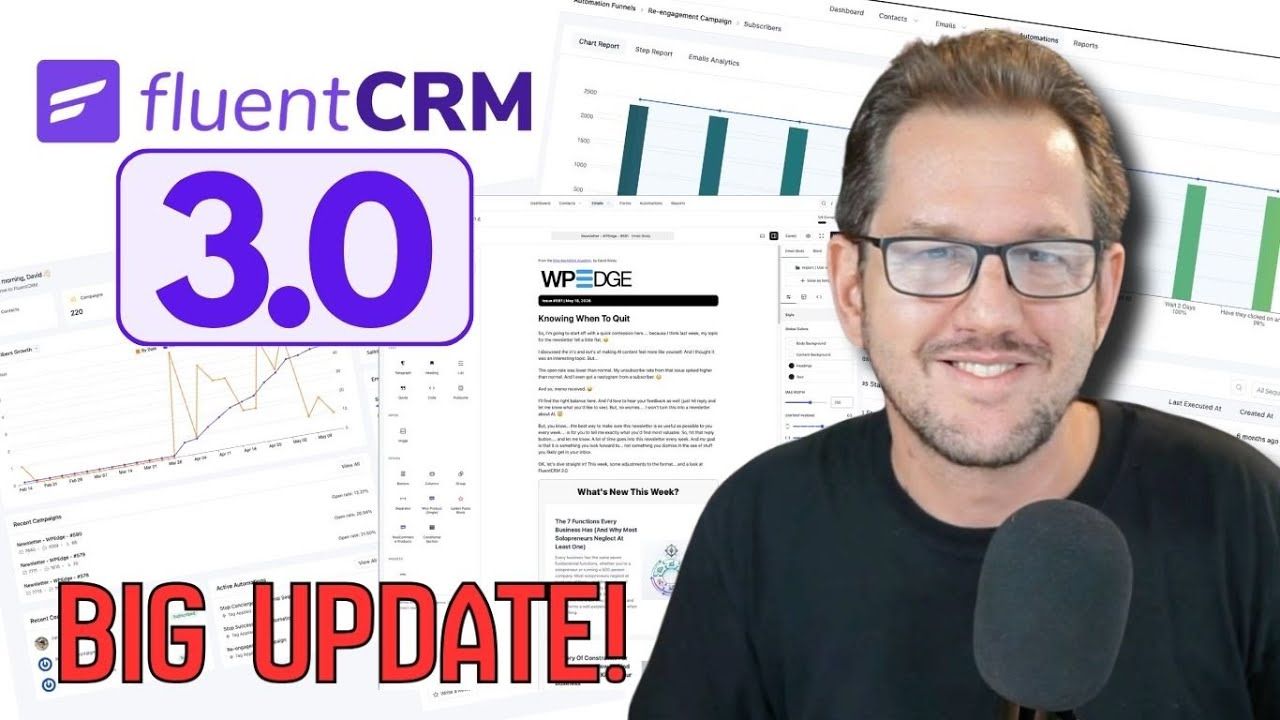
FluentCRM 3.0 is officially out, and I want to give you my honest take on what actually changed and what it means for you.
I’ve been running Release Candidate 2 on my own site for a while now — including putting out my WP Edge newsletter through it — so this isn’t just a feature list I’m reading off a press release. I’ve been in it. And I’ll say upfront: this is a genuinely solid release. Not just a UI coat of paint, though there’s plenty of that too.
Now that version 3 is publicly live, some additional things may have already shipped that weren’t in RC2. But here’s everything I know about from my own testing and from conversations with the team.
A Completely Rebuilt Interface
The most obvious change is the new UI. If you’ve used FluentCart, you’ll feel right at home — WPManageNinja has been methodically updating all their tools to share the same design language, and FluentCRM 3 is the latest to get that treatment.
It’s cleaner, more consistent, and honestly just looks more professional. The previous interface wasn’t bad, but this one is noticeably better. Navigation is improved, accessing campaign previews is easier, and sending a test email is now a quick operation instead of something you have to hunt for.
Under the hood, they’ve rebuilt on Vue 3, which is a big part of why the admin feels snappier. It’s a noticeably faster experience getting around — assuming your server isn’t the bottleneck, anyway.
The New Gutenberg Email Editor
This one I’ve actually used in production, and it’s great. The email editor is now Gutenberg-based, which means if you’ve spent any time in the WordPress block editor, you’re going to feel right at home.
The right-side panel works just like it does when you’re editing a page or post — click a block, adjust its settings. It autosaves now too, which is a welcome change. Anyone who’s been using FluentCRM for a while has probably lost some work at some point because of the previous version’s lack of autosave. That problem is gone.
One feature I’m particularly happy about is patterns. You can create reusable blocks — your signature layout, a CTA section, a product spotlight — save them as patterns, and drop them into any email quickly. If you send a lot of emails with consistent structural elements, this alone is going to save you real time.
Worth noting: the block selection is intentionally limited compared to what you’d have on a webpage. Email clients have strict rendering constraints, so you’re not going to get the full Gutenberg block library. But what’s there works, and it covers what you actually need for email.
SMS Marketing Is Now Built In
This is a new channel entirely. FluentCRM 3 adds native SMS marketing — two-way messaging, tied directly to the contact profile, manageable from the same dashboard as your email campaigns.
It connects via Twilio or Amazon SNS. I’ve used Twilio before and it’s not difficult to get set up. SNS… if you’ve worked with Amazon’s web services interface, you know what you’re in for. But either way, once you’re connected, you can send bulk text campaigns, set up automation triggers based on SMS replies, and do essentially what you do with email — just over text.
I personally don’t have a heavy SMS marketing need right now, so I haven’t tested this one hands-on. But I can see the use cases clearly — webinar reminders, flash offers, appointment follow-ups. For people who are already doing SMS through a separate tool, having it unified in FluentCRM is going to simplify things considerably.
AI Writing Assistant Built Right In
Everybody’s adding AI to everything these days, and a lot of it is noise. This one actually makes sense.
FluentCRM 3 has a built-in AI writing assistant you can activate from the global settings. You plug in an API key — OpenAI, Claude, or Gemini, your choice — and from that point you’ve got an AI assistant available while you’re actually writing emails inside FluentCRM.
What I like is that you can add project-level instructions. Similar to how you’d set up a custom system prompt in ChatGPT or Claude Projects, you feed FluentCRM your brand voice, your tone guidelines, whatever context matters — and the AI uses that when it helps you write. So it’s not just generic output. It’s writing that’s supposed to sound like you.
I’ve seen this in RC2 personally. The settings screen is right there. It’s not vaporware — it’s in the product.
I’m not saying hand all your email writing to AI. But for clients who hit writer’s block staring at a blank campaign, or who need help getting a welcome sequence off the ground, this is going to be genuinely useful.
An MCP Server Is Coming
This one came to me directly from someone at the company — it wasn’t in RC2, but it’s confirmed to be coming. FluentCRM is getting an MCP server.
If you’re not familiar, MCP (Model Context Protocol) is what lets AI tools like Claude or ChatGPT interface directly with external systems. Practically speaking, this means you’ll be able to talk to FluentCRM through your AI tool — running operations, pulling contact data, triggering automations — all through conversation instead of clicking through the admin.
I already do a version of this via direct CLI access to my server, but MCP makes it a lot more accessible and flexible. I’m genuinely excited about this one and can’t wait to get my hands on it.
Other Things Worth Noting
A few more additions that didn’t warrant their own section but are worth knowing about:
Manual contact advancement in automations — you can now manually bump a contact to the next step in a sequence. Small thing, genuinely useful when you need to intervene on a specific contact.
Better automation reporting — the stats view when you click into an automation is cleaner and easier to read. You can see more clearly how contacts are moving through your funnels.
Privacy-first tracking options — there’s now a setting to disable email tracking entirely, or switch to a privacy-friendly mode that gives you aggregate stats without identifying who opened what. Good option for anyone operating in privacy-sensitive markets.
FluentCart abandoned cart recovery — if you’re on FluentCart, this is now built in. I’m still on WooCommerce Subscriptions myself (migration path is the holdup), but the day that changes, I’m moving.
Should You Upgrade?
If you’re already using FluentCRM, yes. This is a worthy upgrade. The new editor alone is worth it, and the AI assistant is going to be useful for a lot of people.
Are there going to be a few rough edges right after a major release? Probably. That’s true of any big version bump. But the WPManageNinja team is genuinely responsive — I’ve seen it firsthand. Bugs get fixed, feedback gets heard. That track record matters when you’re deciding whether to trust a tool with your email marketing.
FluentCRM has always been my recommendation for WordPress-based email marketing, and version 3 just strengthened that position. If you’re picking it up, use coupon code bmamember to save 20%.