
How To Convert From BuddyBoss To FluentCommunity
FluentCommunity is a faster, more streamlined alternative to BuddyBoss. But, converting a BuddyBoss site to FluentCommunity involves some changes. Here’s how it works…
So, you’re deep into the BuddyBoss ecosystem. But, you’re tired of the pesky upgrade issues. You’re tired of the performance issues. You’re tired of the payload that goes along with running a BuddyBoss membership site.
Then, out pops FluentCommunity. It’s bright. It’s shiny. It promises to be much faster.
Can you switch?
Can you convert your BuddyBoss site over to FluentCommunity?
Of course, the answer is YES. However, there’s definitely some things you should know first to decide if you want to. Then, we’ll talk about how to go about it.
Evaluate Whether FluentCommunity Will Work For You
As I type this, the latest version of FluentCommunity is 2.0. So, the limitations I’m about to spell out below may change at some point in the future as future versions are released.
BuddyBoss is more capable than FluentCommunity. BuddyBoss has more features. It makes sense, considering it has been around much longer.
So with that in mind, you need to look at the actual features you are using and which you absolutely NEED… and evaluate whether FluentCommunity will work for you.
As of this writing, FluentCommunity lacks certain features that BuddyBoss users may be used to having. Things like:
- FluentCommunity has no forums. You could probably convert your BuddyBoss forums to BBPress and keep things intact, but FluentCommunity only does groups (they call them Spaces).
- FluentCommunity does’t natively integrate with LMS plugins like LearnDash, since FluentCommunity actually has it’s own course system. You can still make it work (and we’ll cover that in a bit), but if you’re really diggin’ that nice pretty Learndash template that comes with the BuddyBoss theme, you won’t have that anymore.
- FluentCommunity doesn’t have native integrations with Zoom.
- FluentCommunity doesn’t (yet) have custom fields on user profiles. It’s coming, though.
- FluentCommunity user profiles are not as flexible as profiles within BuddyBoss. There’s less that you can customize.
- The overall theme of FluentCommunity is more or less pre-defined and there are far fewer options for customization than you have with a BuddyBoss site.
Now, I’ve worked with a lot of BuddyBoss sites. In fact, as I type these words, I currently have 14 sites under management in Concierge that are running BuddyBoss. My observations are that MOST people don’t use all of the nitty-gritty features of BuddyBoss.
Most people who run it have a dashboard. They have courses (usually in something like Learndash). And they have some groups with user profiles.
If that more or less describes you, then you can convert to FluentCommunity rather simply. As long as you’re OK with the look and feel of your community changing, you can do it.
Running The Built-in Migrator
So, this is the easy part. 😇 FluentCommunity has a built-in migration process that will migrate your data from BuddyBoss into FluentCommunity. What it will include is:
- Groups → Spaces
- Members
- Posts and interactions
- Comments and reactions
Again, if your usage of BuddyBoss is pretty much confined to those features, you’ll be good to go. If you’re using any of the fancier elements of BuddyBoss, it will not transition over.
Before you do anything, I highly recommend you put your site into staging. Create a staging site copy and test things there.
If you haven’t done so already, go ahead and install FluentCommunity on your site. Don’t worry, it can run side-by-side with BuddyBoss since it uses an entirely different table structure and loads up in a sub-folder (usually /portal/).
With all that done, go into FluentCommunity and into the Settings area for the plugin. You will see a menu option called “Manage Migrations”. Click that and you’ll see BuddyBoss right there as your migrator option.
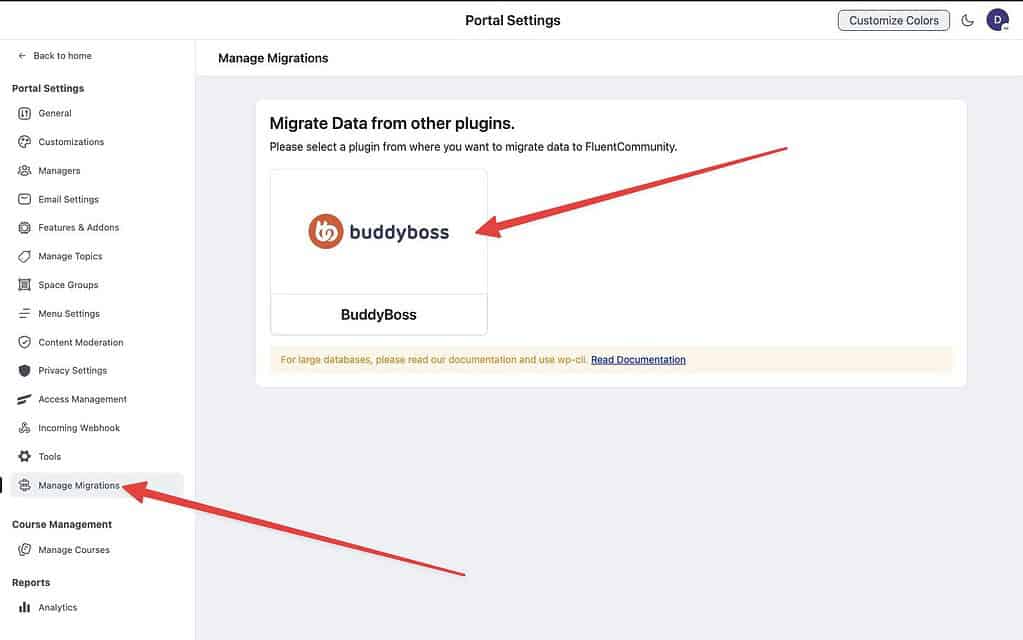
When you click that, it will detect all of the groups you currently have within BuddyBoss. For each one, it will give you the option to assign that group to a particular “Menu Group”. This has to do with the navigation setup of your community. You don’t have to make this decision now, however, so you can just leave all of those dropdowns as default.
You will see a breakdown of what the migrator will move over:
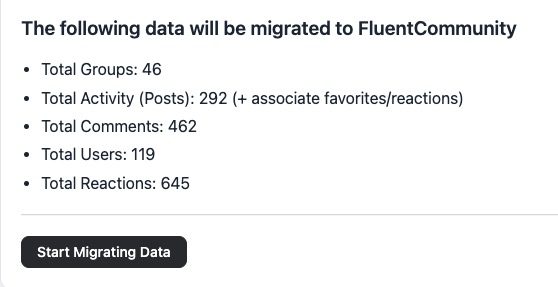
Once you hit the button, it will do it’s thing. Keep the window open as it uses the browser to keep the process moving.
If you’ve got a really large BuddyBoss site, using the user interface may be tough. For a faster and more thorough migration suitable for larger sites, you can run the migrator via WP-CLI with the following command:
wp fluent_community migrate_from_bbIt will do it’s thing…
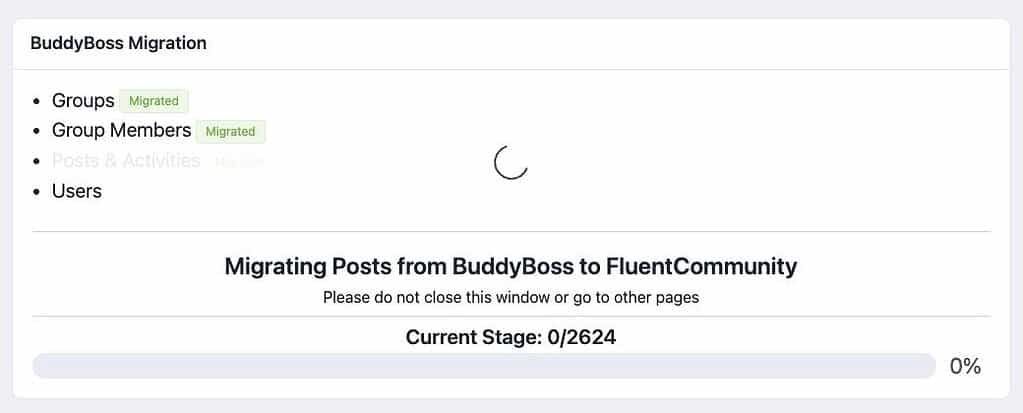
Once done, your groups and all activity will be inside of the FluentCommunity portal. But, after that is where the real work begins.
How To Handle Courses With FluentCommunity
FluentCommunity has it’s own built-in online course system. It is much cleaner and leaner than anything you’ll find with the likes of Learndash. So, does that mean you should switch?
There is (currently) no support for migrating existing courses from any LMS into FluentCommunity. So, unless you want to get really nerdy in the database, you’re pretty much going to need to move course content over manually.
Keep in mind that the FluentCommunity course setup is simpler and it works within the “skin” of FluentCommunity. So, you won’t have the same ability to customize the look and feel as you would if you were using your site’s standard theme.
Now, the other option would be to leave your online courses right where they are. If you’re using LearnDash, for instance, then you can just keep your courses inside of Learndash. Everything will work as usual. The only issue will be the design. The courses will look different since they will be displayed using your standard theme and not the FluentCommunity skin. Don’t worry, though…. below, I will share with you some code you can use that will make all of your Learndash content appear within FluentCommunity. 😎
In my personal opinion, the best long term solution would be to convert your courses into FluentCommunity. This alleviates the bloat and additional expense of running Learndash. However, you can also do this over time.
Turning FluentCommunity Into What You Need It To Be
At this point, you could deactivate the BuddyBoss platform and you should be fine. The data will remain in your database unless you purge it, but now your FluentCommunity portal has all of your group activity feeds.
As you’ll notice, the new portal will be in the /portal/ sub-folder (unless you changed the folder name). And the rest of your site will exist as it has been before. If you’re fine with having this hard delineation between your site and your community portal (in terms of design), then you could probably just leave it like that. Most people, though, are going to want more integration.
FluentCommunity has it’s own design. While you can customize some things, it is pretty set to the way it is. In essence, it has it’s own theme. Thing is, that “theme” isn’t really a theme and it doesn’t run within the WordPress environment. You’re not going to go to your list of installed themes on your site and find anything for FluentCommunity. I’ll show you how to handle that.
FluentCommunity has something called “theme compatibility“. In essence, you can take any PAGE of your site, select FluentCommunity as your page template, and that PAGE will then appear within the FluentCommunity framework. The usual header and footer of your site’s active theme will be bypassed… and the content portion will appear within the “skin” of FluentCommunity.
By using the theme compatibility feature, you can do things like this:
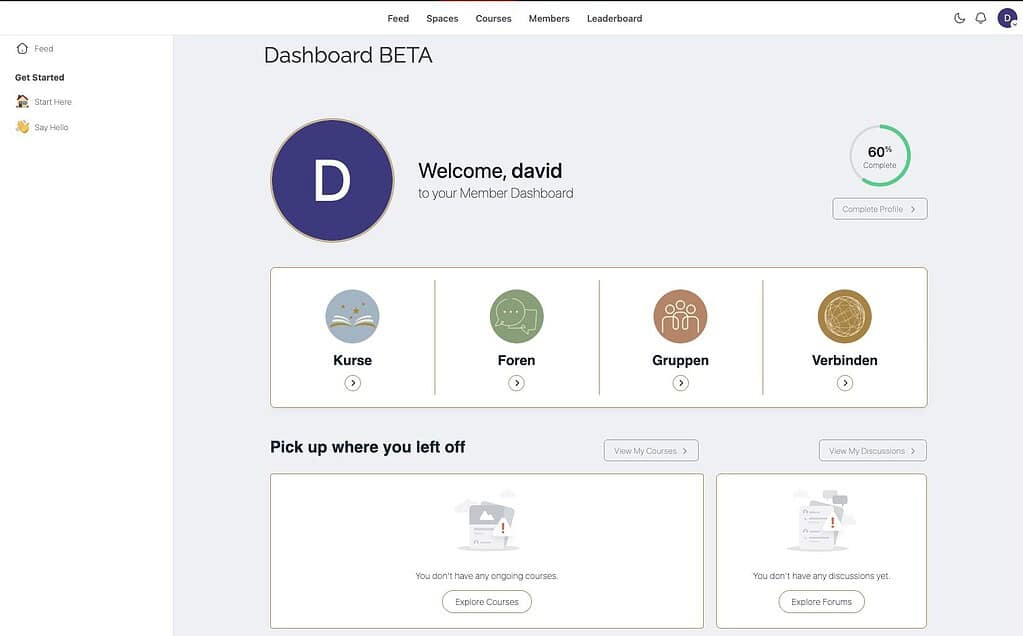
This is a clone of one of my client’s websites. And yes, that’s a BuddyBoss dashboard (built with Elementor and the BuddyBoss theme) showing up within the FluentCommunity framework. Now, in actual practice, you’re not likely to continue using Elementor or the BuddyBoss Theme if you convert to FluentCommunity, but it goes to show you how this can work.
As long as you set the page template for any page to use one of the FluentCommunity options, it will appear as if it is part of your community portal.
You can even apply this to system pages, like I’ve done with my “My Account” screen from WooCommerce:
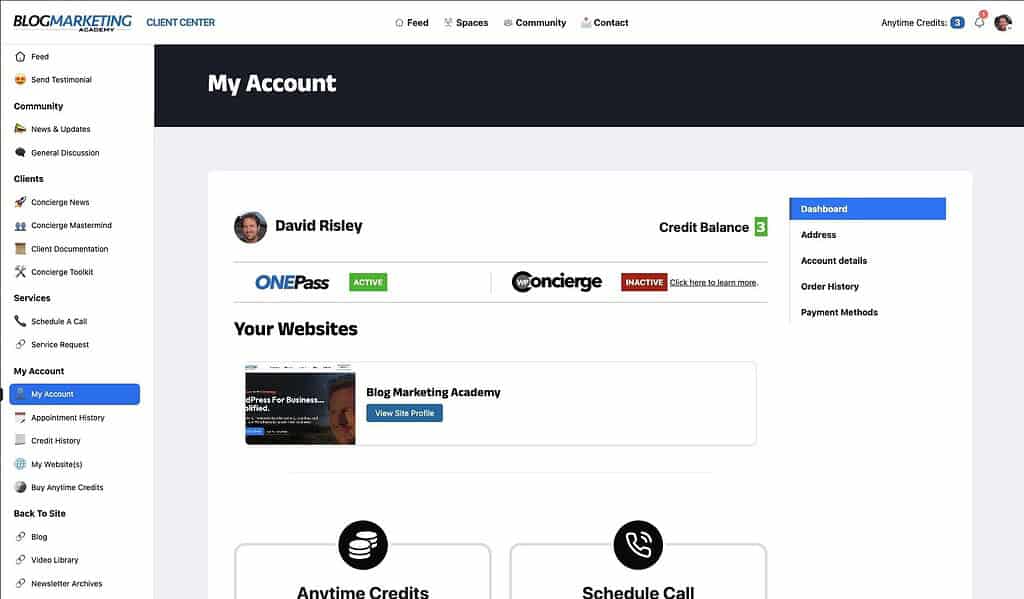
In the above image, you see several things at play here. I’m using Kadence Elements to design my own custom dashboard for the WooCommerce “My Account” screen. Then, I’m setting the “My Account” screen to us the FluentCommunity page template.
Bringing Other Post Types Into FluentCommunity
As of this writing, FluentCommunity has the built-in limitation that the selection of the templates for it only work with pages. This means if you’re using any other post types and want them to appear as part of your community portal, you’ll have to tackle things differently.
For example, what if you wanted LearnDash courses to appear as if they’re inside of your community portal?
In this case, we begin to use code snippets. Until FluentCommunity has other options for this in future versions, we will use code snippets found in the FluentCommunity Github to do what we need to do.
For instance, here’s the code snippet to make Learndash courses, lessons and topics appear within the community portal:
add_filter('fluent_community/template_slug', function ($templateSlug) {
    if(is_singular(['sfwd-courses']) || is_singular(['sfwd-lessons']) || is_singular(['sfwd-topics'])) {
        return 'fluent-community-frame.php';
    }
    return $templateSlug;
});
And if you wanted to use the FluentCommunity “full width” template instead, then your snippet is:
add_filter('fluent_community/template_slug', function ($templateSlug) {
    if(is_singular(['sfwd-courses']) || is_singular(['sfwd-lessons']) || is_singular(['sfwd-topics'])) {
        return 'fluent-community-frame-full.php';
    }
    return $templateSlug;
});
If you wanted to just grab EVERYTHING and override it so that it loads within FluentCommunity, it would be:
// load fluent community frame for all the pages including posts, archives etc
add_filter('fluent_community/template_slug', function ($templateSlug) {
    return 'fluent-community-frame.php';
}, 10, 2);
I usually recommend using Fluent Snippets for code snippets, but you can use any snippets manager you like. You can also drop code into your theme’s functions.php file, but these days that’s the annoying (and harder) way to do it.
Further Customizations To FluentCommunity
The FluentCommunity GitHub is actually a pretty useful resource if you want to do deeper customizations of your community portal. Obviously, a lot of these things are rather nerdy to pull off. 😇 But, point is…. you can.
For instance, my Client Center uses FluentCommunity and you can see that I put the user’s Anytime Credit balance right into the header. I do that using the following code snippet:
/**
 * Show client's credit balance first in Fluent Community top-right header.
 * - Uses user meta key: credit_balance
 * - Displays whole numbers only, no link
 */

add_action('fluent_community/top_menu_right_items', function ($context) {
    if (!is_user_logged_in()) {
        return;
    }

    $user_id = get_current_user_id();
    $raw     = get_user_meta($user_id, 'credit_balance', true);
    $balance = is_numeric($raw) ? intval($raw) : 0;

    // Render the credit balance before any existing right-side items
    echo '<nav aria-label="Top right credits"><ul class="fcom_header_menu top_menu_items fcom_right_menu">';
    echo '<li class="fcom_menu_item_credit_balance">';
    echo '<span class="fcom_menu_link" style="cursor:default;">';
    echo '<span class="fcom_credit_label" style="margin-right:.35em;">' . esc_html__('Anytime Credits:', 'your-textdomain') . '</span>';
    echo '<span class="fcom_credit_value" aria-live="polite">' . esc_html($balance) . '</span>';
    echo '</span>';
    echo '</li>';
    echo '</ul></nav>';
}, 5, 1); // Priority 5 ensures this runs BEFORE other items (lower number = earlier)
This just runs my own custom function and then “hooks” it into the community portal using the “fluent_community/top_menu_right_items” hook.
PRO TIP: You can actually provide a link to the GitHub to your favorite AI coding tool and it can reference the documentation to then help you “vibe code” your own custom code to modify your FluentCommunity portal.
In addition to these deeper customizations you would do using code snippets, you’ve got the things you can do right from within the portal admin area. Things like:
- Setting your site logo
- Changing portal colors
- Setting up custom CSS to customize specific elements of the community portal
- Organizing your top and side menus using the built-in system for defining your menus and menu groups
It takes some time. It takes some testing. Like I said, I recommend you test things out in staging first. 😇 But, it comes together.
Lastly, if you want FluentCommunity to look like your entire website and not sitting in a folder (like /portal/), then the following code snippet can help:
define('FLUENT_COMMUNITY_PORTAL_SLUG', '');This will set the portal “slug” to be empty… thereby basically turning it into your homepage. And yes, I found that in their GitHub. 😉
Bringing It All Together
The process of converting your BuddyBoss site to FluentCommunity is a bit of a process, depending on how “fancy” your BuddyBoss site actually is. But, some quick notes to help clarify a few things:
- You CAN run the BuddyBoss theme without the rest of the platform – and use it within FluentCommunity. Not sure why you would, but you could.
- A lot of pages on BuddyBoss sites are built with Elementor because BuddyBoss is so hard to modify on it’s own. Ultimately, your site will be faster if you abandon Elementor, but know that your Elementor pages should work just fine when loaded up within the FluentCommunity skin.
- FluentCommunity is built atop the same WordPress user profiles. So, any other plugin that works with those user profiles (membership plugins, gamification plugins, etc.) can work alongside FluentCommunity.
In the end, you just need to decide strategically which pages of your site should appear within your community portal – and which are not important to do so.
I personally use (and prefer) the Kadence theme. Any page of this site (even this very blog post) is being powered by Kadence. However, the moment I define it such that it uses the FluentCommunity template, it would look as if it is part of the community portal.
So, you have to decide what needs to look like part of your community portal… and what isn’t important to look that way.
Blog posts? Marketing pages? Probably better to let those run outside the portal.
Members-only pages? Courses? Account pages? Might make sense for those to load up inside of your portal.
You can figure out what makes the most sense for your website.
Got Questions? Need Help?
This post wasn’t intended to be a full step by step. Frankly, it would be hard to write such a thing because the process will be different for every website.
The process of transitioning a BuddyBoss site to FluentCommunity is going to be different case by case. It depends on what features you need, what you need integrated, the theme of your site, etc.
I have experience with both tools. So, if you have any questions, feel free to get in touch.
Or, if you’d like me to jump in there and just help you do it, you can do that as part of my services on an on-demand basis. Or, within Concierge.
Is It Worth It?
In my view, yes.
FluentCommunity is way, WAY faster than Buddyboss. Not only that, I’ve found BuddyBoss sites to be more hassle and more likely to break. So, for me, I think FluentCommunity is a simpler and more streamlined way to go.
Not to mention…. the integration with the rest of the “Fluent” ecosystem is pretty nice. Integrate it with FluentCRM for all the email and automation needs you may have. Integrate with Fluent Support for an entire support desk baked right into your platform. Fluent Forms will provide you with all the integration needs you may have. It is a great ecosystem.
Like I’ve said, Buddyboss is more capable. It does more things. It also happens to be more bloated. And has higher performance requirements. And higher maintenance requirements. So, you get to decide what’s most important to you.

David Risley has been building on the web since 1998 and founded Blog Marketing Academy in 2008. After years helping bloggers and online entrepreneurs grow their businesses, he now runs Concierge — a done-for-you WordPress management service for membership sites and online businesses. He manages hosting infrastructure, handles the technical heavy lifting, and keeps client sites running at peak performance.
Popular Right Now

What If Your Website Was Just… Handled?
I manage WordPress sites for creators and small teams who don’t want to fight tech anymore. Hosting, updates, security, performance — plus a real human you can ask anything.
Tools, checklists, and resources for solopreneurs who want to spend less time on tech — and more time growing. With more tools coming regularly. 😎

