
How I Protect WordPress Sites Against Bots (Using Free Tools)
Bots constantly probe WordPress sites for spam, abuse, and vulnerabilities. In this post, I break down a practical, layered approach to blocking them effectively… including how to stop most bot traffic before it ever reaches WordPress.
Bots are an annoying fact of life when it comes to having a website online. The older and more established your site is, the bigger the problem.
These bots will sit there and slam your site looking for every opportunity for an opening. They’ll try logging into your site. They’ll try spamming your contact forms and blog comments. They may even try ordering things on your checkout forms using fake credit card numbers.
It can make a mess, too. You end up with blog comments to delete. You can end up with fake email addresses opted into your email list. Form submission spam. Fake emails coming through your forms and into your email inbox. Perhaps even bogus orders.
And the results can be unfortunate, too. From spam complaints on your outgoing email address, harming your email deliverability. To chargebacks on your credit card processor, potentially even resulting in account shutdown.
So, what do you do about it?
In this article, I’m going to spell out my exact approach to how I protect my clients’ websites from bots. We’ll discuss some plugin options, but the even BETTER approach is to keep the bots from ever getting to your website in the first place.
What’s A Bot?
I’ve seen a lot over the years. And it continues to boggle my mind the degree of work that these bot creators do to try to spam your website. But first, let’s define our terms…
What exactly is a bot?
A bot is a piece of automated software that visits your website instead of a real human. It doesn’t read, think, or browse the way a person does. It simply follows instructions to perform repetitive tasks at scale, like submitting forms, scraping content, or probing for security weaknesses.

Not all bots are bad. Search engine crawlers are bots and you want to ensure those bots are allowed (unless you don’t like appearing in search engines). AI bots are for various AI tools (like ChatGPT and Claude) to read your site and, in most cases, you probably want those as well.
But, then there’s the bad bots. These are the ones designed to generate spam, abuse web forms, look for security vulnerabilities on your website, and more. Sometimes, you even have “good” bots that are simply too aggressive, so they’re hammering your site so badly that it literally causes performance slowdowns.
Why WordPress Sites Are a Target
WordPress is the most widely used website platform in the world. Powering over 40% of all websites. And that popularity is exactly why it’s a target.
WordPress is very well known. The structure of it is very well known to the world. It represents a very big footprint. From the perspective of a bot creator, that makes it very efficient. You create one bot designed to hammer WordPress and deploy it and it is able to potentially target 40% of the entire internet.
Bots don’t care who you are, how big your business is, or whether your site is “worth hacking.” They care about scale. If a bot can be written once and used against millions of sites built on the same software, it becomes extremely effective.
Here’s what makes WordPress especially attractive to automated attacks:
- It’s predictable. WordPress has well-known file structures, URLs, and behaviors. Bots don’t need to “guess” how a WordPress site works — they already know where to look.
- The plugin ecosystem is massive. Plugins are one of WordPress’s greatest strengths… and also one of its biggest attack surfaces. A single vulnerable plugin can exist on thousands (or millions) of sites, making it a prime target for automation.
- Many sites are poorly maintained. Outdated plugins, weak passwords, unused themes, and abandoned sites are everywhere. Bots are constantly scanning for these low-hanging opportunities.
- Attacks are automated, not personal. Most bot activity isn’t someone “coming after” your site specifically. It’s software scanning the internet 24/7, looking for anything that responds in a predictable way.
Being targeted doesn’t mean your site is unsafe or badly built. It simply means your site exists on the internet.
The Scale of the Bot Problem
One of the most eye-opening things about hosting as many sites as I do (through Concierge) is the visibility it gives you into what’s actually happening behind the scenes.
When I look at the security logs for my own sites and for client sites, I don’t see the occasional random request. I see constant, automated activity at scale.
On a typical day, it’s normal to see:
- Thousands of blocked requests
- Traffic originating from dozens of different countries, such as Pakistan, Indonesia, China, Russia, India.
- Repeated attempts hitting the same URLs over and over. Many times, URLs which don’t even exist and lead to 404 errors, but it is still just randomly trying stuff.
- Bots operating from VPS servers on major cloud hosting providers
Look at this random sample of the security logs for web traffic hitting this very website at the time of writing this article:
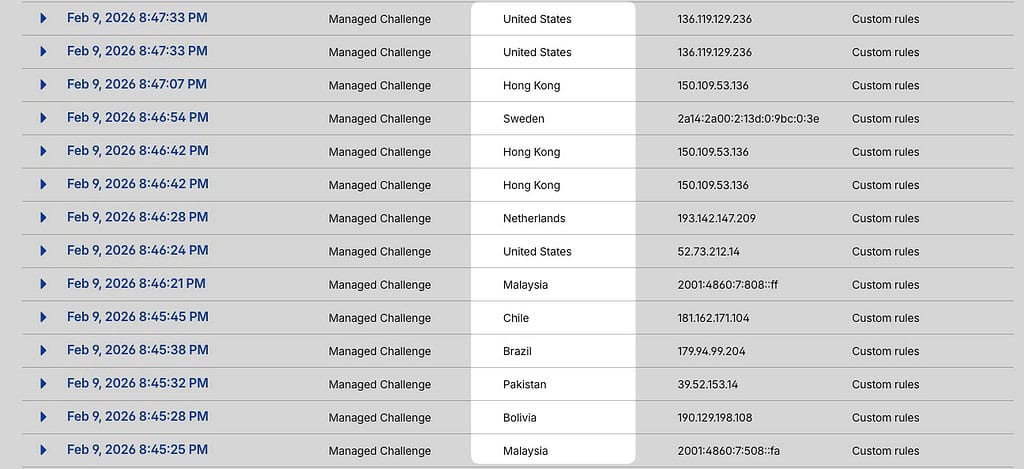
This is all within the span of 2 minutes – mostly from random countries that frankly are not the typical target market for the Blog Marketing Academy.
And this is happening whether a site is brand new, well established, high traffic, or relatively small. Obviously, sites that have been around longer have a larger problem, typically.
Many of the most aggressive bots are hosted on:
- VPS instances
- Cloud servers
- Cheap, disposable hosting accounts
These environments are perfect for automation. They’re fast, scalable, and easy to spin up and tear down. If one IP gets blocked, another can be created minutes later.
Unethical bots aren’t just trying one thing and giving up. They tend to use a mix of tactics, such as:
- Repeatedly submitting forms to test for spam filters
- Probing login URLs to see how authentication is handled
- Requesting common WordPress paths to identify plugins and themes (such as XML-RPC)
- Mimicking browser behavior to appear “human enough”
- Hammering endpoints until they find something that responds differently
Most of these attempts fail. But they don’t need a high success rate. At scale, even a tiny percentage of success makes the effort worthwhile for them.
The key realization…
This is not about stopping a single attack. It’s about reducing exposure to relentless, automated noise.
Once you understand the scale involved, it becomes clear why traditional, reactive approaches like adding more plugins or throwing captchas everywhere often miss the point.
Effective protection isn’t about fighting harder. Or throwing more security plugins on your site that bog it down even further.
It’s about making your site an inefficient target for automation. And, of course, blocking and/or challenging these bots before they ever even get there.
WordPress-Level Approaches to Reducing Bot Activity
Before you ever touch infrastructure-level tools like Cloudflare, there’s a whole category of protections that live directly inside WordPress itself. These are often the first line of defense people reach for… and they absolutely have their place.
Spam protection plugins
Spam-focused plugins are designed to quietly stop automated form submissions, comments, and other low-effort bot activity without interrupting real users.
A good example is WP Armour, which works by adding hidden fields and behavioral checks that humans never notice, but bots tend to trip over. There’s no captcha, no user interaction, and very little overhead.

Tools like this are especially effective against basic spam bots that are blindly submitting forms at scale.
Making your site look different than default
Another common tactic is reducing the available attack vector by making your site act differently than default. This can include:
- Changing or hiding the default /wp-admin or /wp-login.php URLs
- Adding rate limiting or extra checks to login attempts
- Blocking access to admin areas unless specific conditions are met
- Disabling the outmoded XML-RPC system
- Disabling the blog comment system (unless you really, truly want comments). Truth is, most people don’t really need comments or even display them because they don’t get any comments to begin with. Disabling the system altogether reduces a big source of spam.
These measures don’t make WordPress “invisible,” but they do eliminate a lot of automated noise from bots that rely on default paths and assumptions.
Tools I routinely use for these things are PerfMatters as well as Admin & Site Enhancements. You will also find many other performance and utility plugins that can perform these same operations.
Using built-in spam protections in form plugins
Many modern form plugins already include solid spam protection features… they just aren’t always enabled by default
In my own setup, I use Fluent Forms, which includes multiple layers of bot protection such as:
- Honeypot fields
- Token-based spam protection (similar to how WP Armour works)
- IP filtering and basic rate limiting
- Optional integrations with captcha services
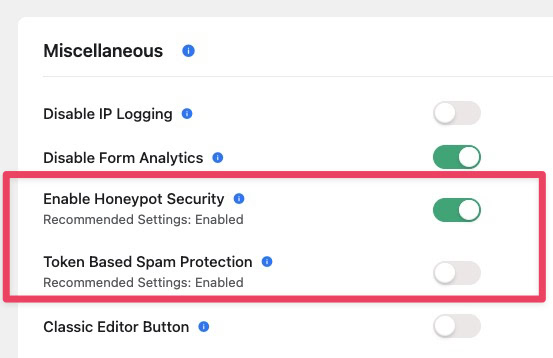
Simply turning these features on can dramatically reduce junk form submissions. Much of the time, real human users won’t even notice.
Using Captchas
Almost any forms plugin will offer the option to integrate with various captcha services. There are also plugins that can enable the usage of captcha for your login form, checkouts, etc.
Captcha works, but it comes with trade-offs. They can be really ugly on your website. They add friction to legitimate human users. They can hurt conversion rates. And they can be SUPER frustrating. I feel a sense of hatred every time I have to sit there and click on photos of bikes, cars, busses or fire hydrants. 🤬
If I do end up using captcha, I almost always use Cloudflare’s Turnstile service. I personally find it less offensive than the other options.

But, I do tend to treat usage of captcha as a last resort. If I can handle the issue in other less obtrusive ways, I will always take that path first.
Why I Don’t Stop at WordPress
All of the approaches above work inside WordPress itself. That also means WordPress still has to load, execute PHP, and process the request before the bot is rejected.
Basically, you’re making WordPress defend itself.
At small scale, that’s fine. At large scale… especially when bots are making thousands of requests per day… it becomes inefficient. It can also really hurt your site’s load times and performance scores. In some cases, it can even artificially inflate your traffic numbers.
That’s where infrastructure-level protection comes in. And that’s why the most effective layer in my stack lives before WordPress ever sees the request.
Most decent web hosts already provide some level of protection at the server level. The effectiveness of these systems vary quite a bit. That can include things like:
- Server-side firewalls
- Basic rate limiting
- ModSecurity or similar WAF rules
- IP reputation blocking
All of that is helpful. And to be clear, it’s better than nothing.
But these protections still live at the server. By the time they’re triggered, traffic has already reached your hosting environment. At small scale, that’s fine. At the scale we talked about earlier… thousands of automated requests per day… it becomes inefficient fast.
This is where Cloudflare changes the game.
Why Cloudflare Is Superior for Bot Protection

Cloudflare sits in front of your server. When you route your domain’s DNS through Cloudflare, you’re no longer relying solely on your web host to defend your site.
Instead, Cloudflare becomes the gatekeeper.
That means bad traffic can be blocked:
- Before it reaches your host and touches your web server
- Before PHP executes
- Before WordPress loads
- Before plugins even have a chance to respond
From an efficiency standpoint alone, this is massive.
The key is DNS. The real power comes from running your DNS through Cloudflare. Don’t manage your domain DNS through Godaddy, Namecheap, or your registrar. I can guarantee you they don’t offer any of these protections. But, when you point your nameservers to Cloudflare and manage your DNS through Cloudflare, that means you gain access to their powerful tools to protect your site.
When you flip that little orange toggle to enable the Cloudflare proxy, that’s when all the goodies kick in.
Cloudflare Security Tools I Rely On
Here’s where Cloudflare really earns its keep.
Custom security rules (WAF)
Cloudflare’s Web Application Firewall allows you to define extremely granular rules based on:
- Request paths
- User agents
- Countries
- IP reputation
- ASN and hosting providers (ASN stands for Autonomous System Number. Basically, it is a number assigned to a particular network, internet provider, or cloud provider.)
- Request methods and headers
This is where I do the bulk of my bot mitigation. Rather than reacting inside WordPress, I block patterns of behavior that are clearly automated and abusive. If a request never reaches WordPress, it can’t cause problems.
Cloudflare’s Built-In Bot Protection Features
Beyond custom security rules (which is where I do most of my heavy lifting), Cloudflare includes several built-in protections that can be enabled with just a few toggles. These don’t require deep configuration, but they still eliminate a large amount of automated noise.
At a high level, these features work by identifying automated behavior and treating it differently than human traffic. And because Cloudflare sees SO MUCH internet traffic, they can see and adapt to bot activity globally.
That includes things like:
- Detecting known bot signatures and frameworks
- Challenging traffic that behaves unlike a real browser
- Slowing down or blocking obvious automation
- Distinguishing helpful crawlers from abusive ones
Two of the most useful options here are Bot Fight Mode and Cloudflare’s AI-related bot protections. Together, they help curb large-scale automation, scraping, and probing activity without affecting real visitors.
What I like about these tools is that they’re passive, mostly invisible to regular people, pretty simple to implement (on or off), and it all happens at the network edge before ever reaching your server.
Cloudflare also offers other built-in security toggles around things like browser integrity checks, basic rate limiting, and threat reputation scoring. Individually, none of these are silver bullets. Collectively, they create an environment that bots don’t enjoy operating in.
And that’s really the goal.
Cloudflare WAF Rules… The Real Workhorse
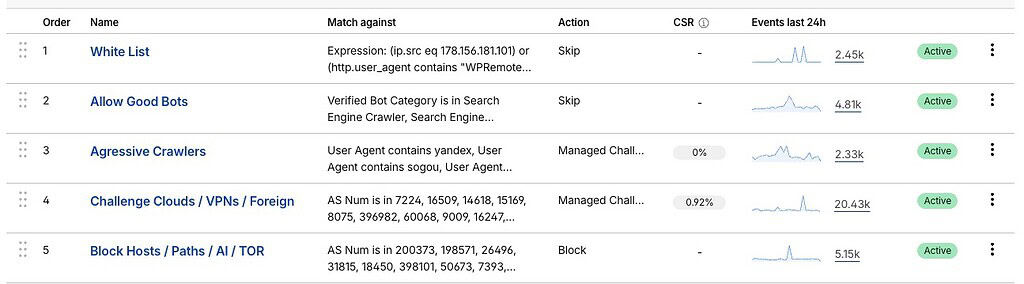
This is where the heavy lifting happens.
Cloudflare’s Web Application Firewall (or WAF) lets you define security rules that evaluate every request before it ever reaches your server. Instead of reacting inside WordPress, you’re filtering traffic based on patterns of behavior.
Think of WAF rules as highly opinionated gatekeeping. They don’t care what plugin you’re using. They don’t care what theme you’re running. They only care about whether a request looks legitimate or automated.
Where these rules came from
I didn’t start from a blank slate.
My rule set was originally inspired by a set of Cloudflare WAF rules (popularly known as Troy’s WAF Rules) published by Troy Glancy, from Web Agency Hero. Troy shared the real-world patterns he was seeing across large, high-profile sites… and how he was using Cloudflare to block them efficiently. You can reference Troy’s WAF rules and copy every single one of them and get a massive head start.
Those rules became a foundation for me. I did made some tweaks specific to the kinds of sites I manage and to Concierge. But, massive credit goes to Troy for sharing those rules with the world.
At a basic level, WAF rules look for things that humans almost never do, but bots do constantly. That includes patterns like:
- Requests to common WordPress paths that normal visitors never hit
- Probing for files or endpoints that shouldn’t exist
- Repeated access attempts that follow scripted sequences
- Requests coming from known cloud hosting providers and VPS networks
- Abnormal request methods or headers
- Requests from particular user-agents
The rules all work together.
How These Security Rules Work Together
One mistake people make with WAF rules is thinking of them as isolated blocks… on or off, allowed or denied.
That’s not how an effective Cloudflare setup works.
Instead, the rules are layered and sequential, with each one serving a specific purpose in the decision-making process.
At a high level, the flow looks like this:
- Skip rules – These are evaluated first. They tell Cloudflare which traffic should bypass further inspection entirely. This is how you protect known good actors… things like search engines, uptime monitors, or trusted services your site relies on. Essentially, this is your white list.
- Challenge rules – If traffic isn’t explicitly trusted, it may be challenged. Cloudflare can issue lightweight, automated challenges that real browsers pass instantly, but bots often fail or slow down on.
- Block rules – Finally, clearly abusive or automated traffic is outright blocked. These are the requests that match known bad patterns and have no legitimate reason to reach your site.
Each rule narrows the funnel. By the time traffic reaches a hard block, it has already failed multiple checks.
This layered approach keeps false positives low while still being very aggressive against automation.
Keeping This Free… On Purpose
Cloudflare’s free plan allows up to 5 custom security rules.
All of the rules I’ll be sharing have been intentionally designed and refined to fit within that limit. That means you can implement this entire setup without paying Cloudflare a dime. In fact, these are the exact rules I use for all of the clients I manage in Concierge and I don’t use any of Cloudflare’s paid services.
It forces discipline. It means each rule has to pull its weight. And in practice, these 5 rules stop the vast majority of junk traffic WordPress sites see.
That said, upgrading to a paid Cloudflare plan does unlock the ability to create many more rules, add greater granularity, and build a much more comprehensive WAF. If you’re running a large site, handling sensitive data, or operating at serious scale, that can absolutely be worth it.
But for most WordPress site owners… a carefully designed set of five rules goes a very long way and is likely all that you need.
Interestingly, some web hosts utilize Cloudflare Enterprise baked into their service. For instance, I used to host numerous client sites with Rocket.net and Cloudflare Enterprise is baked in. Certainly, there are certain WAF rules baked into that which means hosting on such hosts is going to give you an advantage over typical shared web hosting.
But, there is a catch…
You cannot control the rules. When I was using Rocket.net hosting, I had zero control over the WAF rules. I couldn’t view them or tweak them. I could ask their support people to make a tweak, but then it was up to me to make a record of what I had asked them to do because I couldn’t see it anywhere. I had no control.
Not only that, but it wasn’t as effective. Interestingly, I found that my WAF rules I implemented myself FOR FREE was actually far more effective at mitigating bot traffic than the supposedly solid WAF rules offered via Cloudflare Enterprise.
So, I prefer to control it myself. And, I think you should, too.
My Actual Cloudflare WAF Rules (Copy/Paste)
In this article, I’ve focused on explaining the strategy behind effective bot protection… not dumping a raw list of firewall rules into a public post.
The Cloudflare WAF rules I use are meant to be copied, pasted, and implemented correctly, in the right order, with an understanding of how they interact. Without context, it’s easy to misapply them or break legitimate traffic.
In my case, I actually create an API integration to quickly implement these rules on client sites. Then, I often need to make specific tweaks for various unique needs, such as SEO plugins, unique software the client uses, etc.
How to access my exact WAF rules
There are two ways to go from here:
ONEPass members get access to a members-only implementation workshop that includes:
- The exact Cloudflare WAF rules I use
- Copy/paste-ready rules that fit within the free Cloudflare plan
- A step-by-step video showing how to implement them in a standard (free) Cloudflare account
- Guidance on what to tweak and what to leave alone
If you’re hands-on and want to implement this yourself, ONEPass is the fastest path.
Concierge clients don’t need to touch any of this. Implementation of these Cloudflare security rules comes standard with Concierge service. I configure, maintain, and tune the rules for your site based on real traffic patterns, and adjust them over time as conditions change. If you find there’s a false positive and something is getting blocked, you just need to tell me and I’ll fix it for you.
ONEPass teaches you how to do what I do. Concierge means I do it for you.

A free reference point
If you’d like to explore the underlying ideas without joining ONEPass or Concierge, then I point you back to the original inspiration for my own setup: Troy’s WAF Rules. It is all out in the open – with specific instructions on how to implement them and copy/paste ready rules you can drop into the Expression editor in Cloudflare.
Yes, it is a little bit nerdy. 😇 Goes with the territory.
My rules build on that foundation and adapt it specifically for WordPress sites. Plus, for ONEPass members, I’ll directly show you on video how to implement these rules.
Final Thoughts (And Next Steps)
Bots are not a theoretical problem. They’re a constant background reality of running a WordPress site on today’s internet.
Most of them aren’t sophisticated. They don’t think. They don’t adapt in real time. They rely on volume, predictability, and poorly defended sites.
That’s actually good news.
Effective protection isn’t about fighting harder or piling on plugins. It’s about blocking automated behavior as early as possible, before it wastes server resources or ever reaches WordPress.
For me, that means:
- Sensible WordPress-level protections
- Minimal reliance on captchas
- And a strong Cloudflare layer that stops abuse at the edge
Once that foundation is in place, everything else gets quieter. Fewer spam submissions. Fewer failed logins. Fewer mystery performance issues. Less mental overhead.
There’s no such things as perfection. Even with rules and proper mitigation in place, you’re still going to have SOME bots make their way through. They can be sneaky little bastards. 🤪 But, the goal here is that you have weapons in your arsenal to handle it.
Your next step
If you want to implement this yourself, ONEPass gives you access to the exact Cloudflare WAF rules I use, along with a step-by-step workshop showing how to deploy them correctly on a free Cloudflare account.
If you’d rather not touch any of it, Concierge includes full implementation and ongoing management of these rules for your site. I handle the setup, tuning, and adjustments over time so you don’t have to think about bot protection at all.
Either way, the goal is the same… make your site uncooperative to bots, while keeping it fast and friendly for real humans.
Popular Right Now

What If Your Website Was Just… Handled?
I manage WordPress sites for creators and small teams who don’t want to fight tech anymore. Hosting, updates, security, performance — plus a real human you can ask anything.
Tools, checklists, and resources for solopreneurs who want to spend less time on tech — and more time growing. With more tools coming regularly. 😎

