
AnalyticsWP Review: Does It Make Sense To Track Your Site Traffic Using A WordPress Plugin?
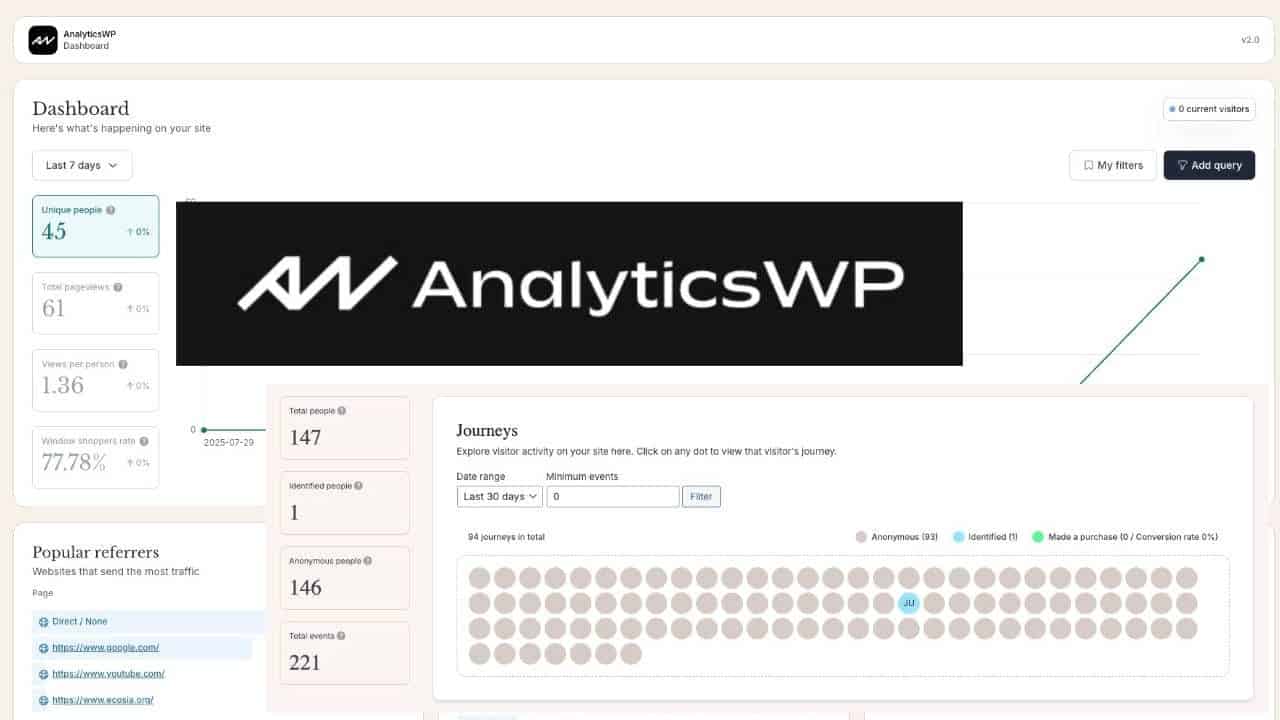
Does it make sense to run a plugin like AnalyticsWP that runs entirely on WordPress? Will it slow down your site? Let’s take a look at this popular WordPress analytics plugin.
It wasn’t along ago that there was a list of things I would NEVER recommend you do within WordPress itself. Two of those things were (1) Manage your email list, and (2) Track your traffic.
Things have changed. 😇
With email, plugins such as GroundHogg and FluentCRM (which I use personally) changed my mind. The convenience of having everything baked into the same software stack was too hard to ignore. It makes life SO much easier. Integrate with a reliable email delivery platform and you’ve got a tool every bit as good as the big, expensive solutions like ActiveCampaign.
Then, there’s analytics. Wouldn’t tracking your traffic within WordPress cause all kinds of data bloat and server load problems?
Certainly, it would make things simpler. No tag managers. No privacy problems. No GDPR concerns. Perfect integration.
That brings me to AnalyticsWP. A plugin that allows you to track your website’s traffic right within WordPress itself.

So, is this thing any good?
What Does AnalyticsWP Do?
Put simply, it will track your site stats. To be clear, it does not track everything but it DOES track what’s most important.
Installing your analytics is as simple as activating the plugin. There’s no other work to be done. No tags to paste in your header or anything. It doesn’t get any easier.
AnalyticsWP will track page views, unique visitors, referrers, device types, popular pages, etc. It also provides a live look at traffic browsing your website in real-time. It also tracks UTM tags for campaign tracking.
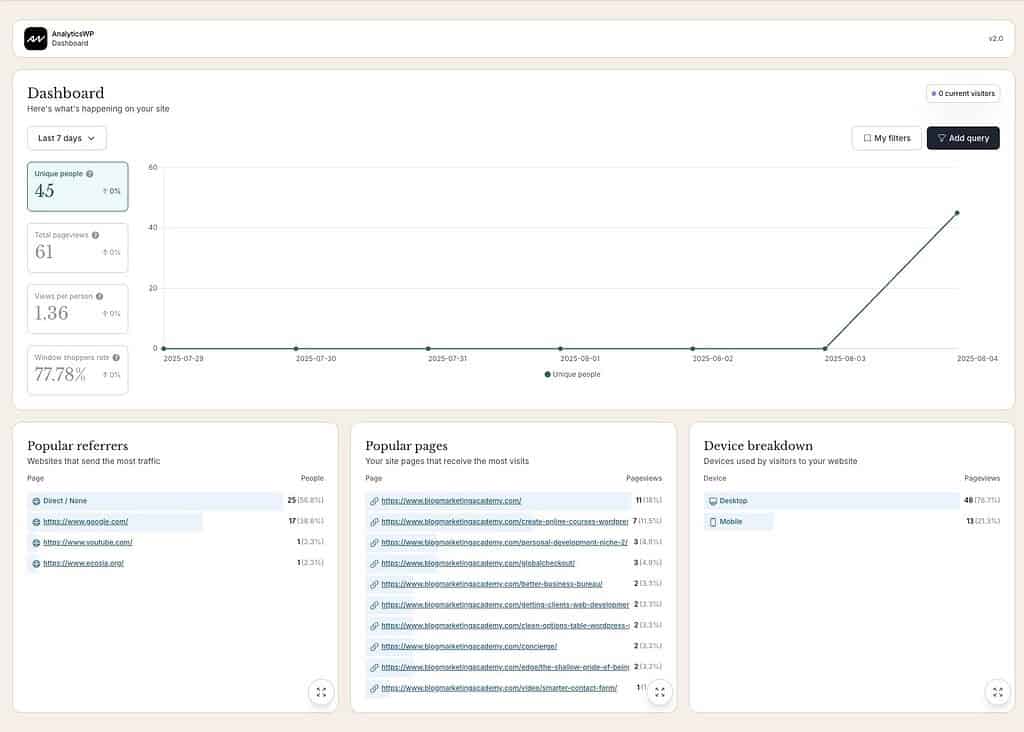
There are indeed things that AnalyticsWP currently doesn’t track that remote tools like Fathom Analytics and especially Google Analytics do. For instance, there’s currently no data regarding user location, so you can’t track traffic by country. There’s no granular data about screen resolution, operating system or other fine-tuned agent data that you can find in Google Analytics.

Being directly integrated into WordPress also provides clear advantages. For instance:
- There’s direct seamless integrations with tools like WooCommerce or SureCart, builders like Elementor or Bricks, or forms plugins like Fluent Forms and Gravity Forms. This provides a level of deep conversion and journey tracking that wouldn’t be possible in a remote tool.
- You can track user journeys, even down to specific users. If you run this on a membership site, for instance, you would be able to see specific user interactions with your website and AnalyticsWP will know who they are because it can see your entire user database.
The fact that all of your data is being stored within WordPress and NO data is being sent to third-parties means there is (potentially) no need for legal mumbo-jumbo with regard to the GDPR. Given what it can track, GDPR could still apply but the plugin integrates with cookie consent plugins so that’s taken care of.
There is also no issues with data accuracy. Nothing about it can be blocked by ad blockers or privacy blocking plugins. It also won’t track bots. Everything is coming from your domain only…. meaning perfect statistical tracking and accuracy.
Will AnalyticsWP Hurt Page Load Times?
The effects of this kind of tracking on page load is why I would have always recommended against a plugin like this. But, I will say that I have investigated this directly and I no longer have that concern. At least not with AnalyticsWP.
When installed, one single database table is added to your site’s database. From then on, each page view to your site will result in a new row being added to this table. The tracking script itself comes in at about 1.4KB, so it is very small. This is on par with my go-to tracking service of Fathom Analytics, which has a tracker of 1.6KB. Contrast this with the most popular tool – Google Analytics. That one has a compressed tracker size of about 70KB.
Here’s a table that I asked ChatGPT to create comparing the size of several analytics tools and the tracker scripts:
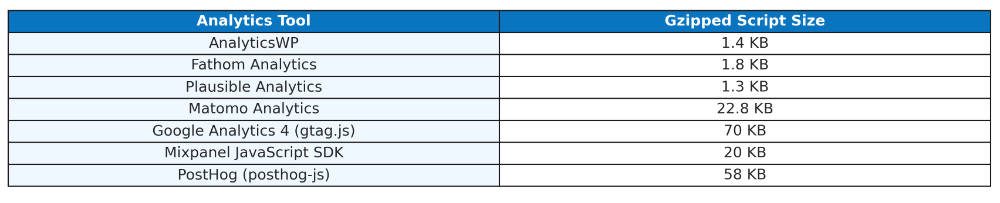
Clearly, the script size of the AnalyticsWP tracker is among the smallest. This means it is not adding to the overall footprint of the page load much at all.
The AnalyticsWP database table has 20 fields and it is highly optimized using indexes. Combined with the fact that AnalyticsWP doesn’t track more than is needed and the truth is that….
AnalyticsWP is plenty snappy and will not slow down your site. I know all plugin websites will say the same thing, but after looking at the innards of this one, I believe it. It is a pretty streamlined setup.
Does It Clutter The Database?
As for the impact of that tracking table in the database getting bigger and bigger, remember that these databases are very, VERY efficient by nature. Not to mention that people are using plenty of plugins all the time that store GOBS of data in WordPress.
Whether it is tracking data on forms, or analytics data in your SEO plugin…. it is routine for database tables to end up having hundreds of thousands of rows and end up being many megabytes in size. This is normal… and AnalyticsWP would be no different.
That said, one issue with AnalyticsWP is that it currently does not have any data management functionality at all things for like purging the data, exporting it, etc. I do think they should have that functionality for peace of mind. That said, if you were to stop using AnalyticsWP, all you’d have to do is drop that one tracking table in your database and it would be like it was never there.
Why I Think AnalyticsWP Has Advantages
I have been using Fathom Analytics for awhile now and I offer Fathom as an option for all of my Concierge clients at no additional cost to them. The service works great.
Related Reading: Why I Stopped Using Google Analytics (And What I Use Instead)
I think AnalyticsWP may offer some advantages, however. Even for my clients who are already using Fathom Analytics, I think this has advantages. Namely…
- Complete data sovereignty. Your site’s data stays with your website and will be backed up automatically with every backup. There is no longer any concern about switching analytics platforms. My clients wouldn’t even need to worry about their stats being “trapped” in Fathom Analytics if they were to move their site away from me. There’s ways of dealing with that, but it is hard to beat the convenience of having it all right there.
- User-level analytics. For people running membership sites and running sales through WordPress, the automatic tracking of user sessions to traffic is handy. You cannot track things to that degree with any remote service. There are often ways to pass data like user and email to a remote service for tracking and conversions, but then you’re got privacy issues to contend with. You have none of that when you’re using AnalyticsWP because the data never goes anywhere.
- Completely seamless integration. There is literally nothing you need to do to have it all work than to just activate the plugin. Even Fathom is more work to integrate than that.
- Local code. This means, you can make integrations and do things “in house” that would not otherwise be possible. AnalyticsWP has developer docs to show the technically inclined how to work with it. Point is, it can be done.
I should also note that Conversion Bridge also works with it. This is a plugin I really like that sets up deeper integration with specific events across your site. Conversion Bridge works with a number of remotely hosted analytics tools, but it also works with AnalyticsWP. In many instances, this will ensure there’s no need to dive into the developer documentation for AnalyticsWP.
Where I Think AnalyticsWP Falls Short
One could point out some of the data points that it does not track (such as user location, specific device details, etc.), but I don’t think that stuff matters all that much to most site owners. If it does, then ensure you are using a tool which tracks what you need.
So, putting that aside, there are still some things that I think the developers of AnalyticsWP should do to improve the plugin.
#1 – Lacks Data Pruning/Export Options
I think this plugin needs to have options to purge and prune the data stored within the database. I think it should also have a checkbox that ensures that all data is removed if the plugin is uninstalled.
I also think it could stand to have data export options to export to CSV to allow data chugging within a spreadsheet if the user prefers. While you could technically export it directly from the database table, having it right in the UI would be a potentially useful tool for some.
#2 – Needs To Make User Journeys Optional
This is one of the core benefits of the plugin, to be clear. However, being able to track things down to the user level also means there needs to be informed consent that such a thing is being tracked. This isn’t anonymized algorithmic tracking, but the site’s owner can actually directly see who it is and anything the user does (when they are logged-in).
I think it would be good to offer the option to ensure tracking is completely anonymous.
#3 – Making IP Tracking Optional
While the plugin claims to be fully GDPR compliant (because it doesn’t send the data anywhere), the plugin IS tracking user IP addresses. Every single record in the database table stores the IP address of the user doing it.
Legally, I’m not sure where this stands. I’m not a lawyer. But, I’m not seeing any point to the IP tracking. The site’s owner can’t SEE the IP address in the plugin’s UI as it seems to depend instead on unique session IDs. But, sure enough, if you look in the database table, the IP address is right there.
AnalyticsWP does integrate with cookie consent plugins, so from that perspective, it is fully GDPR compliant as long as you use it correctly.
#4 – Make UTM tracking reports more obvious.
While the plugin supports UTM tags, the only way to view the data is by running filters on the dashboard. Then, to save it for future use, you have to save that filter as a separate action. I think some form of easy display of UTM activity on the main dashboard would be convenient.
#5 – Admin Dashboard Widget
Being able to pull and display some of the basic stats right on the Admin dashboard just seems like low-hanging fruit, yet the feature is missing. That feels like a lost opportunity.
#6 – Integrate With Admin Screens
With the data all being stored locally, it feels like another obvious thing to be able to integrate the analytics with the posts and pages across the site. In other words, when I am viewing the list of posts in the admin panel, why don’t I have the option to instantly click on just the stats for that post?
Once again, this feels like low-hanging fruit for a plugin like this, yet it is missing.
The plugin should register columns into the admin screens so that aggregate traffic data can be viewed on list screens. And adding an action link to be able to instantly filter the stats and view data on any singular post or page just feels like a massive missing convenience.
#7 – Simple Funnel Tracking
It would be SUCH an awesome feature to have the ability to set up funnels and visually track the conversion rates. Meaning, you define a funnel by defining the page URLs to be included (sales page, thank you page, etc.) and then AnalyticsWP could chug the data to present a visual report of the funnel flow.
This would be such a great feature to have in this plugin.
Let’s Talk Pricing
The licensing cost for AnalyticsWP is quite affordable.

A single site license is only $99 and you can use it on unlimited sites for only $199. And get this…
Both of these are one-time charges. No recurring fees. Both are lifetime licenses.
Now, this is both good… and bad. 🧐
The good news is that this is pretty affordable. The potentially bad news is that I worry if the company has enough incentive here to keep developing and improving the plugin.
A look at the changelog shows they are indeed doing things. Their big 2.0 release was in January of this year (2025). They released “Agency Mode” in February, allowing agency owners to track multiple client sites from one installation. Bug fixes were released in both April and May.
So, the jury is out on that one. As nice as a lifetime option is, part of me would be more comfortable if I saw a recurring revenue model here so that the incentive is there on their end to provide ongoing support and more confidence that updates will continue into the future.
That said, even if it ever became abandonware, the truth remains that you’ve got the code and the data is stored in-house. So, there’s not a whole lot of risk.
Final Thoughts on AnalyticsWP
AnalyticsWP is certainly a very viable option for easy tracking of your site stats in a way which maintains data sovereignty. It is super easy to use and provides a lot of convenience by being directly integrated with your tech stack.
I am now running it on this very website, although (for now) I will continue to run Fathom Analytics as well.
I am also adding AnalyticsWP to the Concierge Toolkit to be available for all of my clients if they so choose. As I said, I think it has some great uses for membership site owners and sites running WooCommerce.
Popular Right Now

What If Your Website Was Just… Handled?
I manage WordPress sites for creators and small teams who don’t want to fight tech anymore. Hosting, updates, security, performance — plus a real human you can ask anything.
Tools, checklists, and resources for solopreneurs who want to spend less time on tech — and more time growing. With more tools coming regularly. 😎

