So, I have this crazy idea. To see if I can put out a new video every day. For 30 days.
In today’s feature article below, I spell out why I would even consider this madness.
Plus, ever find big upticks of spam opt-ins into your email list? Of course you have…. because it is kinda common. Well, it happened to me last week, too. And I found and plugged a hole…. and it is something you should consider as well for your own site.
So, a productive week ahead! Lots to do! So, let’s kick this off…
A Video A Day – Can I Actually Do It?
I think I’m about to try something. I’m thinking about trying – for 30 days – to put out a new video on Youtube every day of the week. Monday through Friday.
Yes, it’ll be hard. And I’m sure I’ll dial it back. But, I think it would be a good form of exercise. And not only that, it will put a lot more outflow into the world.
Back when I did more business coaching, I used to say: outflow equals inflow. Simple idea. Almost embarrassingly simple.
The more you put out into the world, the more comes back to you. Traffic, leads, income… it all flows back roughly in proportion to what you’re putting out. Not in some woo-woo, law-of-attraction sense. Just mechanically. More people see your name and your work, more of them find their way back to you.
In some of my previous training content, I talked about this triangle for email marketing. 3 corners: Frequency, Personality and Relevance. Expanding any of those corners expands the triangle and makes it more effective.
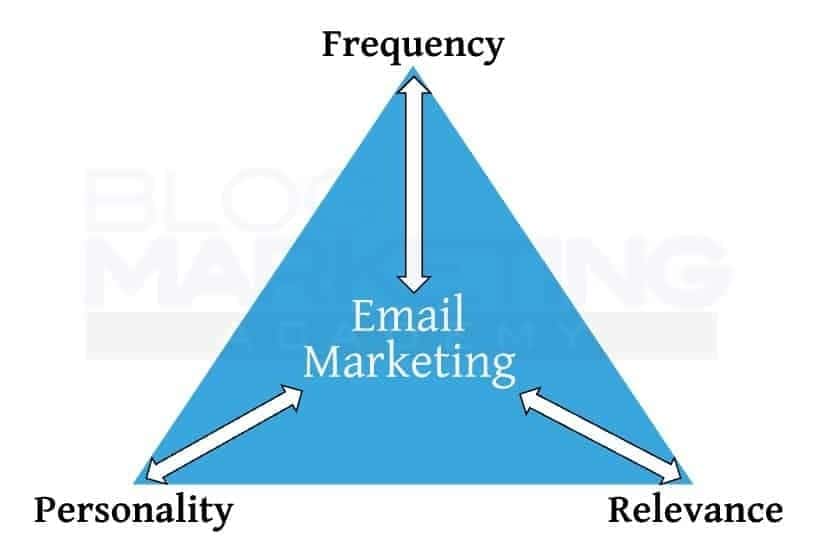
This is true for ALL forms of content, really. If you’re relevant to them, relatable and likable (personality), and often enough (frequency), it works better. And all too often, people fall flat on one or more of these corners. For instance, these days, AI can help people rapidly increase their frequency, but it lacks personality and blends into the background.
The problem is that most of us aren’t putting out nearly enough. And when we do put something out, we’re only putting it on our own website. Publish a blog post, watch the crickets. Wonder why nobody’s reading.
Here’s the thing: your own website is where you own the audience. But it’s not where you find the audience. Those are two different jobs, and conflating them is one of the more common mistakes I see solopreneurs make. Me too, frankly. It is much easier to publish content on my own site. It is harder to do it elsewhere. Especially in video format.
But, you have to go where people already are. And for my particular target audience, Youtube happens to be my biggest generator of new awareness (view my channel here). I’ve had more clients come in after originally finding me on Youtube than any other platform.
For you, it may be YouTube. Social media. Guest appearances. Podcasts. Other newsletters. Anywhere there’s an existing audience that overlaps with yours. You put your stuff out there, some percentage of those people find their way back. Over time, that compounds.
It’s not complicated. It just requires consistent effort at a scale most people don’t sustain. Which is why I’m thinking of doing this daily Youtube challenge. To develop the ABILITY to sustain it.
I’m applying the triangle to my most effective promotional channel: video. By shortening them and making them much tighter (relevance) and really leaning into the frequency. Personality kinda takes care of itself when you’re on camera.
YouTube videos don’t expire. A video you made three years ago can still drive traffic today if it covers the right topic. Compare that to a blog post, which depends heavily on Google playing nicely with you… and I don’t know about you, but I’m not feeling super confident about that lately. A lot of people out there are reporting lowered traffic patterns because of all of the AI-oriented changes to search.
The other thing about video (and podcasting can be similar) is that it is the RIGHT kind of communication for the modern age. They’re real. They’re relatable. People can SEE you. Which means… what you say has a higher likelihood of actually being duplicated on the receiving end. Truth is, even the best blog posts out there don’t get read all the way through these days. People scan them and search for the TLDR. But, a video that is on-point, engaging and not long-winded? People will usually watch it all the way through. Which means, your message is received.
And so… here’s the idea for my 30-day Youtube challenge. Or whatever it ends up being.
One video per day. Monday through Friday. If it becomes ridiculous for me, I may dial it back to Mon, Wed, Fri but that would be my baseline for the challenge.
Single video hooks. Keep them to the point. If anything, I’ve tended to be long-winded on Youtube, so that’s part of my exercise. To dial it back and try to keep the video 4-5 minutes long. No fancy editing. Just get in there, deliver my value, give them a brief CTA, then get the hell out of there.
Yes, the Youtube algorithm likes the regularity. This can help promote my channel. But, I wouldn’t do this merely for the algorithm. I do this for me. The actual WORK of figuring out how to rapidly produce valuable videos is a skill that pays off over time.
It is just like writing frequent emails to your list. The more you do it, the better you get at it.
The goal isn’t to become a “YouTube creator” as some kind of identity thing. The goal is simple: put more out, get more back. I’m not chasing viral hits or spending three days optimizing thumbnail A/B tests. I’m just going to show up more consistently and let the compounding do its job.
You probably have a version of this too. There’s likely a channel you know you should be more active on but aren’t. A platform where your audience hangs out that you’ve been half-heartedly posting to. Or not at all.
The bottleneck usually isn’t ideas or time. It’s inertia.
But that’s exactly where the growth is. Outflow equals inflow. Put more out, get more in. It’s not a secret. It’s not sophisticated.
It just takes actually doing it.
The Inside Scoop
I’ve had several people reach out to me asking my opinion about Fluent Player. This is the new tool launched last week by the “Fluent” team. A video player solution with full integration into their other tools – and an effective replacement for Presto Player.
I will be doing a video review of Fluent Player very shortly. I am in the process of switching things over to it, but there are a few minor things I need them to take care of first. The big one is the support for dynamic custom fields in the shortcode for usage in templates. Until it has that, I cannot fully migrate out of Presto Player.
But, Fluent Player looks like a great tool. A better, faster interface than Presto Player. Integration with the other Fluent tools is a big plus. Plus, the Fluent dev team is far more responsive. Frankly, I think the Presto plugin is mostly dead. Sure, it has minor updates, but nothing really new from them in awhile. I think that team is working on other projects now and spread too thin, but that’s just a theory.
FluentPlayer is being added to the Concierge Toolkit. It is now available for all Concierge clients on the Core plan or higher. Just reach out if you would like to use it for your site’s videos.
If Presto Player is working fine for you, no major need to switch just to move onto a shinier object. There’s a LOT of feature overlap between the tools, frankly. But, if you’re not thrilled with Presto, we can certainly give FluentPlayer a good evaluation.
WordPress News & Updates
WordPress Search Interest Is Climbing Back
Brad Williams flagged it this week: Google Trends shows WordPress search interest returning to 2017 levels in 2026. The analysis is worth a quick read — AI was supposed to replace WordPress, but instead it’s generating content that still needs somewhere to live. Funny how that works.
WordPress 7.0.1 Is Out
31 bug fixes across Core and the Block Editor. Most sites will auto-update… but if yours doesn’t, go ahead and push it manually. Nothing dramatic, just good maintenance.
FluentPlayer Pro Launches
WPManageNinja shipped FluentPlayer Pro this week — their new video player for WordPress with multi-source embedding (YouTube, Vimeo, BunnyCDN, Mux, and more), interactive layers, playlists, and built-in analytics. Deep integration with the rest of the Fluent suite. If you host video content or run courses on WordPress, worth checking out.
FluentCommunity 2.7.0
A solid update dropped for FluentCommunity this week. New Space Media Gallery, FluentPlayer integration for lessons (you can tie lesson completion to actually watching the video), smarter moderation that counts distinct reporters so nobody games it, collapsible sidebar, and invite-by-email. The platform keeps maturing.
FluentCart 1.5.3: A Store That Answers
The headliner in FluentCart 1.5.3 is MCP integration. Connect an AI assistant and it can now tell you what a product actually earns after costs and discounts, which subscription payments are coming due, and read your full payment and refund ledger directly. Not just “here are your orders”… actual margin data. Plus tax display improvements and installment plan accuracy fixes throughout.
WP Rocket Adds MCP Support
WP Rocket now supports MCP, meaning AI tools can connect directly to your site’s performance data, adjust caching settings, and measure changes. Parent company group.one is rolling the same thing out to Rank Math, BackWPup, and GTmetrix in the same release. MCP is becoming a real pattern in the WordPress plugin world.
WooCommerce Caps AI-Generated Pull Requests
WooCommerce is capping external contributors at 3 open PRs at a time, after AI-generated patches flooded the codebase with plausible-looking-but-not-ready code. The money quote from the maintainer: “A pull request should not be opened simply because a tool produced a plausible-looking patch.” The AI slop problem is now reaching the open source contribution layer.
WordPress Is Moving Off Meetup.com
After years of discussion, WordPress has officially committed to replacing Meetup.com with GatherPress, an open-source event plugin built for the community. The driver: Meetup.com costs the community roughly $250,000 per year. A lot to pay a for-profit platform to host volunteer meetups.
WP Engine Challenges Foundation Trademark Applications, Alleging Fraud
The legal saga rolls on. WP Engine is now opposing the WordPress Foundation’s trademark applications for “Managed WordPress” and “Hosted WordPress” in both the US and Canada, including a fraud allegation that the Foundation knew 50+ companies were already using those phrases when it filed. Canada’s IP office has already issued a provisional refusal. The US jury trial isn’t set until October 2027… so this has a long way to go.
Are Declining Plugin Sales the Canary in the Coalmine?
A worthwhile op-ed digging into the data: roughly 80% of plugin companies surveyed reported flat or lower new sales in 2025. Woosa’s revenue dropped 78% from its 2023 peak. Several shops have closed or gone free. The argument is that utility plugins AI can now replicate are getting crushed, while platform-critical products are holding up. Worth reading if your business touches the plugin ecosystem at all.
SiteGround’s 2026 AI in WordPress Report
SiteGround surveyed 7,000+ WordPress small business owners and found 78% are using AI daily… but 41% need multiple attempts to get usable results, and there are now 3,000+ AI plugins in play without much cohesion between them. Everyone’s using AI. Nobody’s quite figured out what to do with it yet.
Tutor LMS 4.0 Launches
Major redesign for Tutor LMS this week, with a “learner-first” overhaul and mobile-first interface changes. If you’re running a course site on WordPress with Tutor LMS, the update is worth a look.
Where Are Those Spam Submissions To The Email List Coming From?
So, here’s something that came up for me last week. I noticed that I was getting a noticeable uptick in opt-ins to my email list. Thing is… they didn’t look legit. I had spambots opting into my list. From the logs, it looks like they were just jamming past the opt-in in order to get to The Solopreneur Toolkit, because the bots were instantly trying to download everything in there. Kinda funny, really.
But, I found the hole. And it brings up a lesson I wanted to share with you, too.
I run Kadence on Blog Marketing Academy, and I use FluentForms as my dedicated form plugin. I had a handful of forms that were still running through Kadence’s Advanced Form block — a few left over from before I’d fully consolidated things, and a couple I’d kept there specifically to use Kadence Conversions‘ native tracking capability.
That’s where the problem was. While I was using Fluent Forms for most forms, I had a few stragglers which were using the forms built right into Kadence.
Bots found the endpoint and started submitting entries directly.
Here’s what was happening. Kadence’s form block submits via WordPress’s standard admin-ajax.php endpoint. So does Elementor’s form widget. So does Spectra’s form block. That’s normal WordPress architecture — nothing inherently wrong with it. But admin-ajax.php is publicly accessible, and a bot that scrapes your page can pull the form ID and security nonce right out of your HTML, then POST submissions directly to the endpoint without ever triggering your frontend protections.
The defense against this is server-side spam protection. Honeypot fields. reCAPTCHA. Turnstile. Something that validates the submission before it gets processed.
Kadence does support this — but through a separate plugin. The Kadence reCAPTCHA plugin adds v2, v3, and Cloudflare Turnstile support to the Advanced Form block. Another option is something like WP Armour, which integrates with Kadence and can add honeypot protection that way. These work. I just wasn’t running either of them because Fluent Forms doesn’t need them.
Here’s the lesson…
Page builder form blocks are convenient. You drop one in, wire up your integration, it does what you need. The result is that forms end up scattered across your site. Sometimes intentionally, sometimes just because you set them up a while back and moved on. Each one potentially sitting there with no spam protection configured — not because you don’t know it exists, but because it’s not part of the system you’re actively managing.
Dedicated form plugins are different. They often have better built-in spam protection functions, since the whole thing is purpose-built for forms. Not only that, it means you can see and manage all of your forms from one post. This means you pay attention. It isn’t just a visual “shoot from the hip” thing you casually threw together in your page builder.
So, my solution was to replace those few straggler Kadence forms with properly set up forms with Fluent Forms. I consolidated everything into one plugin.
One settings panel for spam protection. One dashboard for submissions and analytics. One integration layer talking to FluentCRM. Kadence Conversions handles the popup behavior just fine with a FluentForms form inside it — it even fires the native conversion tracking and suppression logic automatically.
The motto here is simple…
Use a dedicated forms plugin to manage your forms. Just one. Don’t spread forms all around different plugins. And don’t build forms using your page builder or block builder. Stick to a real, dedicated forms manager. And then, of course, ensure you have the proper bot protection mechanisms in place to make it harder for bots to bypass your forms rather than having the front door wide open.